Lesson 14: UNION
In Lesson 13, we learned numeric, conversion, and conditional functions. So far we've queried data with a single SELECT. But sometimes you need to combine results from multiple queries, like "top 5 products + bottom 5 products". In this lesson, we learn how to combine results with UNION.
Already familiar?
If you're comfortable with UNION, UNION ALL, INTERSECT, and EXCEPT, skip ahead to Lesson 15: DML.
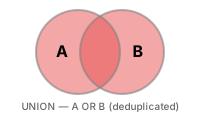
UNION stacks the results of two or more SELECT statements vertically. Each query must return the same number of columns, and the corresponding column types must be compatible. Column names come from the first query.
UNION combines two query results vertically. Column count and types must match.
UNION vs. UNION ALL
| Operator | Duplicate Handling | Speed |
|---|---|---|
UNION |
Removed (acts like DISTINCT) |
Slow -- requires sorting/hashing for dedup |
UNION ALL |
Kept | Fast -- no dedup step |
Use UNION ALL when you know there are no duplicates, or when you want to count all occurrences.
Basic UNION
-- Combine VIP and GOLD customers into one list
-- (No duplicates possible from the same table, but UNION removes them just in case)
SELECT id, name, grade FROM customers WHERE grade = 'VIP'
UNION
SELECT id, name, grade FROM customers WHERE grade = 'GOLD'
ORDER BY name;
This result is identical to
WHERE grade IN ('VIP', 'GOLD'), but UNION's true power shows when combining different tables.
Combining Different Tables
A typical UNION use case: creating a unified activity feed or report from multiple source tables.
-- Activity log combining a specific customer's orders and reviews
SELECT
    'order'   AS activity_type,
    customer_id,
    ordered_at AS activity_date,
    CAST(total_amount AS TEXT) AS detail
FROM orders
WHERE customer_id = 42

UNION ALL

SELECT
    'review'  AS activity_type,
    customer_id,
    created_at AS activity_date,
    '별점: ' || CAST(rating AS TEXT) AS detail
FROM reviews
WHERE customer_id = 42

ORDER BY activity_date DESC;
SELECT
    'order'   AS activity_type,
    customer_id,
    ordered_at AS activity_date,
    CAST(total_amount AS CHAR) AS detail
FROM orders
WHERE customer_id = 42

UNION ALL

SELECT
    'review'  AS activity_type,
    customer_id,
    created_at AS activity_date,
    CONCAT('별점: ', rating) AS detail
FROM reviews
WHERE customer_id = 42

ORDER BY activity_date DESC;
SELECT
    'order'   AS activity_type,
    customer_id,
    ordered_at AS activity_date,
    total_amount::text AS detail
FROM orders
WHERE customer_id = 42

UNION ALL

SELECT
    'review'  AS activity_type,
    customer_id,
    created_at AS activity_date,
    '별점: ' || rating::text AS detail
FROM reviews
WHERE customer_id = 42

ORDER BY activity_date DESC;
Result:
| activity_type | customer_id | activity_date | detail |
|---|---|---|---|
| order | 42 | 2024-11-18 | 299.99 |
| review | 42 | 2024-11-20 | 별점: 5 |
| order | 42 | 2024-09-03 | 89.99 |
| review | 42 | 2024-09-05 | 별점: 4 |
| ... |
-- All 2024 complaint and return events
SELECT
    'complaint'         AS event_type,
    c.customer_id,
    c.created_at        AS event_date,
    c.title             AS description
FROM complaints AS c
WHERE c.created_at LIKE '2024%'

UNION ALL

SELECT
    'return'            AS event_type,
    o.customer_id,
    r.created_at        AS event_date,
    r.reason            AS description
FROM returns AS r
INNER JOIN orders AS o ON r.order_id = o.id
WHERE r.created_at LIKE '2024%'

ORDER BY event_date DESC
LIMIT 10;
Creating Rollup Reports with UNION ALL
-- Category revenue + add total row
SELECT
    0 AS sort_key,
    cat.name AS category,
    SUM(oi.quantity * oi.unit_price) AS revenue
FROM order_items AS oi
INNER JOIN products   AS p   ON oi.product_id = p.id
INNER JOIN categories AS cat ON p.category_id = cat.id
INNER JOIN orders     AS o   ON oi.order_id   = o.id
WHERE o.status IN ('delivered', 'confirmed')
  AND o.ordered_at LIKE '2024%'
GROUP BY cat.name

UNION ALL

SELECT
    1 AS sort_key,
    '합계' AS category,
    SUM(oi.quantity * oi.unit_price) AS revenue
FROM order_items AS oi
INNER JOIN orders AS o ON oi.order_id = o.id
WHERE o.status IN ('delivered', 'confirmed')
  AND o.ordered_at LIKE '2024%'

ORDER BY 1, 3 DESC;
SQLite note:
CASEexpressions cannot be used directly inORDER BYwithUNION/UNION ALL, and using column position numbers instead of aliases is safer. Above,ORDER BY 1, 3 DESCmeans first column (sort_key) ascending, third column (revenue) descending.
Result (partial):
| sort_key | category | revenue |
|---|---|---|
| 0 | Gaming Laptop | 636925700.0 |
| 0 | AMD | 447953400.0 |
| 0 | Gaming Monitor | 353934400.0 |
| 0 | NVIDIA | 345858700.0 |
| 0 | 2-in-1 | 340884400.0 |
| 0 | General Laptop | 291760500.0 |
| 0 | Professional Monitor | 254590200.0 |
| 0 | Speakers/Headsets | 232144800.0 |
| ... | ... | ... |
INTERSECT -- Intersection
INTERSECT returns only rows that exist in both query results.
-- Customers who both wrote reviews and filed complaints
SELECT customer_id FROM reviews
INTERSECT
SELECT customer_id FROM complaints;
SQLite note:
INTERSECTis supported in SQLite 3.34.0+ (2020-12). Also available in MySQL 8.0.31+ and all PostgreSQL versions.
-- Application: VIP customers who ordered in the last 6 months
SELECT id FROM customers WHERE grade = 'VIP'
INTERSECT
SELECT DISTINCT customer_id FROM orders
WHERE ordered_at >= DATE('now', '-6 months');
EXCEPT / MINUS -- Set Difference
EXCEPT returns rows from the first query result that are not in the second query result. In Oracle, it's called MINUS.
-- Customers who wrote reviews but never filed complaints
SELECT customer_id FROM reviews
EXCEPT
SELECT customer_id FROM complaints;
-- Orders that were placed but shipping never started
SELECT id FROM orders WHERE status = 'confirmed'
EXCEPT
SELECT order_id FROM shipping;
EXCEPTreturns the same result as aNOT INsubquery orLEFT JOIN ... IS NULLanti-join, but the set operation syntax is more readable.
Comparing UNION vs. INTERSECT vs. EXCEPT
| Operator | Meaning | Set Symbol |
|---|---|---|
| UNION | Union (A ∪ B) | ∪ |
| INTERSECT | Intersection (A ∩ B) | ∩ |
| EXCEPT | Difference (A − B) | − |
All three operations remove duplicates. To keep duplicates, use UNION ALL, INTERSECT ALL, EXCEPT ALL (support varies by database).
Summary
| Concept | Description | Example |
|---|---|---|
| UNION | Combine results after removing duplicates | SELECT ... UNION SELECT ... |
| UNION ALL | Combine results keeping duplicates (faster) | SELECT ... UNION ALL SELECT ... |
| INTERSECT | Rows in both sides (intersection) | SELECT ... INTERSECT SELECT ... |
| EXCEPT | Rows only in the first (set difference) | SELECT ... EXCEPT SELECT ... |
| Column matching rule | Both SELECTs must have matching column count/types | Column names follow the first query |
| Combining different tables | Activity logs, feedback consolidation, etc. | Orders + Reviews -> Activity feed |
| Rollup reports | Add total row with UNION ALL | Control sorting with sort_key |
| ORDER BY placement | Once for entire result, at the very end | Written after the last SELECT |
Lesson Review Problems
These are simple problems to immediately test the concepts from this lesson. For comprehensive practice combining multiple concepts, see the Practice Problems section.
Practice Problems
Problem 1
Combine VIP grade customers' names and grades with GOLD grade customers' names and grades using UNION into a single list. Sort by name.
Answer
SELECT name, grade FROM customers WHERE grade = 'VIP'
UNION
SELECT name, grade FROM customers WHERE grade = 'GOLD'
ORDER BY name;
Result (example):
| name | grade |
|---|---|
| Aaron Gillespie | GOLD |
| Aaron Medina | GOLD |
| Aaron Powell | GOLD |
| Aaron Ryan | GOLD |
| Abigail Richardson | VIP |
| Adam Johnson | VIP |
| Adam Moore | VIP |
| Adrian Davis | GOLD |
| ... | ... |
Problem 2
Combine all active product (is_active = 1) names and all category names using UNION to create a deduplicated name list. The result column should be name.
Answer
Result (example):
| name |
|---|
| 2-in-1 |
| AMD |
| AMD Ryzen 9 9900X |
| AMD Socket |
| APC Back-UPS Pro Gaming BGM1500B Black |
| ASRock B850M Pro RS Silver |
| ASRock B850M Pro RS White |
| ASRock B860M Pro RS Silver |
| ... |
Problem 3
Create a "negative events" list combining cancelled and returned orders from 2023-2024. Use UNION ALL with event_type ('cancellation' or 'return'), order_number, customer_id, event_date (use cancelled_at for cancellations, completed_at for returns). Sort by event_date descending.
Answer
SELECT
    'cancellation'  AS event_type,
    order_number,
    customer_id,
    cancelled_at    AS event_date
FROM orders
WHERE status = 'cancelled'
  AND cancelled_at BETWEEN '2023-01-01' AND '2024-12-31 23:59:59'

UNION ALL

SELECT
    'return'        AS event_type,
    order_number,
    customer_id,
    completed_at    AS event_date
FROM orders
WHERE status = 'returned'
  AND completed_at BETWEEN '2023-01-01' AND '2024-12-31 23:59:59'

ORDER BY event_date DESC;
Result (example):
| event_type | order_number | customer_id | event_date |
|---|---|---|---|
| cancellation | ORD-20241229-31194 | 1616 | 2024-12-31 11:37:44 |
| cancellation | ORD-20241228-31179 | 1971 | 2024-12-30 00:01:41 |
| cancellation | ORD-20241228-31177 | 2552 | 2024-12-28 21:35:05 |
| cancellation | ORD-20241226-31148 | 1420 | 2024-12-27 20:44:43 |
| cancellation | ORD-20241225-31134 | 1303 | 2024-12-26 18:43:50 |
| cancellation | ORD-20241223-31096 | 3326 | 2024-12-25 19:56:46 |
| cancellation | ORD-20241222-31087 | 1220 | 2024-12-24 13:53:00 |
| cancellation | ORD-20241220-31038 | 2264 | 2024-12-21 08:47:52 |
| ... | ... | ... | ... |
Problem 4
Create a "customer feedback" list combining 2024 reviews and 2024 product Q&A (questions only, parent_id IS NULL). Use UNION ALL with feedback_type ('review' or 'qna'), product_id, customer_id, created_at. Sort by created_at descending, showing only the top 20.
Answer
SELECT
    'review' AS feedback_type,
    product_id,
    customer_id,
    created_at
FROM reviews
WHERE created_at LIKE '2024%'

UNION ALL

SELECT
    'qna' AS feedback_type,
    product_id,
    customer_id,
    created_at
FROM product_qna
WHERE parent_id IS NULL
  AND created_at LIKE '2024%'

ORDER BY created_at DESC
LIMIT 20;
Result (example):
| feedback_type | product_id | customer_id | created_at |
|---|---|---|---|
| review | 241 | 3714 | 2024-12-31 23:05:31 |
| review | 209 | 3905 | 2024-12-31 10:47:07 |
| qna | 109 | 1544 | 2024-12-31 05:50:42 |
| qna | 223 | 3974 | 2024-12-29 19:05:30 |
| review | 214 | 1903 | 2024-12-29 10:19:21 |
| review | 246 | 2324 | 2024-12-28 23:13:40 |
| review | 182 | 1530 | 2024-12-28 20:28:36 |
| qna | 29 | 4422 | 2024-12-28 18:28:41 |
| ... | ... | ... | ... |
Problem 5
Aggregate count by payment method, then add a total row with UNION ALL. Display 'Total' for the total row's method. Target only payments where status = 'completed'.
Answer
SELECT
    0 AS sort_key,
    method,
    COUNT(*) AS tx_count
FROM payments
WHERE status = 'completed'
GROUP BY method

UNION ALL

SELECT
    1 AS sort_key,
    '합계' AS method,
    COUNT(*) AS tx_count
FROM payments
WHERE status = 'completed'

ORDER BY sort_key, tx_count DESC;
Result (example):
| sort_key | method | tx_count |
|---|---|---|
| 0 | card | 15556 |
| 0 | kakao_pay | 6886 |
| 0 | naver_pay | 5270 |
| 0 | bank_transfer | 3429 |
| 0 | point | 1770 |
| 0 | virtual_account | 1705 |
| 1 | 합계 | 34616 |
| ... | ... | ... |
Problem 6
Aggregate count by customer grade, then add a grand total row ('Total') with UNION ALL. Target only is_active = 1 customers. Sort so the total row comes last.
Answer
SELECT
    0 AS sort_key,
    grade,
    COUNT(*) AS cnt
FROM customers
WHERE is_active = 1
GROUP BY grade

UNION ALL

SELECT
    1 AS sort_key,
    '전체' AS grade,
    COUNT(*) AS cnt
FROM customers
WHERE is_active = 1

ORDER BY sort_key, cnt DESC;
Result (example):
| sort_key | grade | cnt |
|---|---|---|
| 0 | BRONZE | 2289 |
| 0 | GOLD | 524 |
| 0 | SILVER | 479 |
| 0 | VIP | 368 |
| 1 | 전체 | 3660 |
| ... | ... | ... |
Problem 7
Create a customer engagement summary. Use UNION ALL to aggregate total orders, total reviews, and total complaints per customer. Wrap the union result as a subquery (derived table) to aggregate into one row per customer, and return the top 10 by total activity count.
Answer
SELECT
    customer_id,
    SUM(activity_count) AS total_activity
FROM (
    SELECT customer_id, COUNT(*) AS activity_count
    FROM orders GROUP BY customer_id

    UNION ALL

    SELECT customer_id, COUNT(*) AS activity_count
    FROM reviews GROUP BY customer_id

    UNION ALL

    SELECT customer_id, COUNT(*) AS activity_count
    FROM complaints GROUP BY customer_id
) AS all_activity
GROUP BY customer_id
ORDER BY total_activity DESC
LIMIT 10;
Result (example):
| customer_id | total_activity |
|---|---|
| 97 | 463 |
| 226 | 410 |
| 98 | 398 |
| 162 | 352 |
| 356 | 319 |
| 227 | 318 |
| 549 | 313 |
| 259 | 248 |
| ... | ... |
Problem 8
Aggregate count and average amount by order status, then add a total row with UNION ALL. Wrap the result as a subquery to calculate pct (the percentage each status count represents of the total, to 1 decimal place).
Answer
SELECT
    status,
    order_count,
    avg_amount,
    ROUND(100.0 * order_count / SUM(order_count) OVER (), 1) AS pct
FROM (
    SELECT
        0 AS sort_key,
        status,
        COUNT(*)            AS order_count,
        ROUND(AVG(total_amount), 2) AS avg_amount
    FROM orders
    GROUP BY status

    UNION ALL

    SELECT
        1 AS sort_key,
        '합계' AS status,
        COUNT(*)            AS order_count,
        ROUND(AVG(total_amount), 2) AS avg_amount
    FROM orders
) AS t
ORDER BY sort_key, order_count DESC;
Result (example):
| status | order_count | avg_amount | pct |
|---|---|---|---|
| confirmed | 34393 | 999813.63 | 45.8 |
| cancelled | 1859 | 1045258.09 | 2.5 |
| return_requested | 507 | 1600567.46 | 0.7 |
| returned | 493 | 1337615.77 | 0.7 |
| delivered | 125 | 1566145.88 | 0.2 |
| pending | 82 | 1063783.45 | 0.1 |
| shipped | 51 | 1452363.65 | 0.1 |
| preparing | 24 | 510284.5 | 0.0 |
| ... | ... | ... | ... |
Problem 9
Aggregate active and inactive product counts per supplier separately, combine with UNION ALL, then wrap as a subquery to create one row per supplier (active count, inactive count). JOIN with the suppliers table to also display company name.
Answer
SELECT
    s.company_name,
    SUM(CASE WHEN t.status_type = 'active' THEN t.cnt ELSE 0 END) AS active_count,
    SUM(CASE WHEN t.status_type = 'inactive' THEN t.cnt ELSE 0 END) AS inactive_count
FROM (
    SELECT supplier_id, 'active' AS status_type, COUNT(*) AS cnt
    FROM products WHERE is_active = 1
    GROUP BY supplier_id

    UNION ALL

    SELECT supplier_id, 'inactive' AS status_type, COUNT(*) AS cnt
    FROM products WHERE is_active = 0
    GROUP BY supplier_id
) AS t
INNER JOIN suppliers AS s ON t.supplier_id = s.id
GROUP BY s.company_name
ORDER BY active_count DESC;
Result (example):
| company_name | active_count | inactive_count |
|---|---|---|
| Samsung Official Distribution | 21 | 4 |
| ASUS Corp. | 21 | 5 |
| MSI Corp. | 12 | 1 |
| TP-Link Corp. | 11 | 0 |
| Seorin Systech | 11 | 1 |
| Logitech Corp. | 11 | 6 |
| LG Official Distribution | 11 | 0 |
| ASRock Corp. | 9 | 2 |
| ... | ... | ... |
Problem 10
Combine the 'highest priced product' and 'lowest priced product' per supplier into one list. Use UNION ALL with price_type ('highest' or 'lowest'), company_name, product_name, price. Sort by company_name, price_type.
Answer
SELECT
    '최고가' AS price_type,
    s.company_name,
    p.name  AS product_name,
    p.price
FROM products AS p
INNER JOIN suppliers AS s ON p.supplier_id = s.id
WHERE p.is_active = 1
  AND p.price = (
      SELECT MAX(p2.price)
      FROM products AS p2
      WHERE p2.supplier_id = p.supplier_id AND p2.is_active = 1
  )

UNION ALL

SELECT
    '최저가' AS price_type,
    s.company_name,
    p.name  AS product_name,
    p.price
FROM products AS p
INNER JOIN suppliers AS s ON p.supplier_id = s.id
WHERE p.is_active = 1
  AND p.price = (
      SELECT MIN(p2.price)
      FROM products AS p2
      WHERE p2.supplier_id = p.supplier_id AND p2.is_active = 1
  )

ORDER BY company_name, price_type;
Problem 11
Find the intersection of customers who wrote reviews and customers who filed complaints. Use INTERSECT and count the resulting customer_ids.
Answer
Problem 12
Use EXCEPT to find customers who added products to their wishlist but never placed an order. Return customer_id, sorted ascending.
Answer
Scoring Guide
| Score | Next Step |
|---|---|
| 11-12 | Move on to Lesson 15: DML |
| 8-10 | Review the explanations for incorrect answers, then proceed |
| Half or fewer | Re-read this lesson |
| 3 or fewer | Start again from Lesson 13: Numeric, Conversion, and Conditional Functions |
Problem Areas:
| Area | Problems |
|---|---|
| Basic UNION (dedup) | 1, 2 |
| UNION ALL + combining different tables | 3, 4 |
| UNION ALL + total row (rollup) | 5, 6 |
| UNION ALL + subquery aggregation | 7, 8, 9 |
| UNION ALL + correlated subquery | 10 |
| INTERSECT (intersection) | 11 |
| EXCEPT (set difference) | 12 |