Lesson 23: Indexes and Query Execution Plans
An Index is a data structure that allows the database to find rows quickly without scanning the entire table. Understanding when indexes help and when they do not is the foundation of query performance tuning.
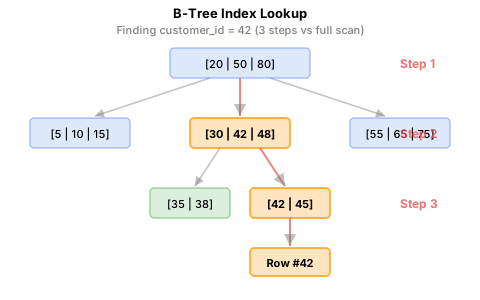
A full scan checks all 37,000 rows. A B-Tree index reaches the desired row in 2-3 levels of traversal.
Already familiar?
If you are comfortable with creating/dropping indexes and EXPLAIN, skip ahead to Lesson 24: Triggers.
The Role of Indexes
Without an index, the database must read every row in the table to find matching rows (Full Table Scan). With an index on the search column, it jumps directly to the relevant rows. It is like the difference between using a book index and reading from beginning to end.
Scanning a table with 34,689 orders checks all 34,689 rows. With an index on customer_id, this is reduced to 5-10 index lookups.
EXPLAIN QUERY PLAN
EXPLAIN QUERY PLAN shows how the database plans to execute a query, i.e., whether it will scan or use an index.
No index — Full Table Scan:
customer_id index present — Index Lookup:
Checking Existing Indexes
This database has pre-created indexes on all foreign keys and frequently queried columns.
Result example:
| name | tbl_name | sql |
|---|---|---|
| idx_orders_customer_id | orders | CREATE INDEX idx_orders_customer_id ON orders(customer_id) |
| idx_orders_ordered_at | orders | CREATE INDEX idx_orders_ordered_at ON orders(ordered_at) |
| idx_order_items_order_id | order_items | CREATE INDEX ... |
| idx_order_items_product_id | order_items | CREATE INDEX ... |
| idx_reviews_product_id | reviews | CREATE INDEX ... |
| ... |
SCAN vs. SEARCH Comparison
When Indexes Help
| Situation | Index Effect |
|---|---|
WHERE col = ? on high-cardinality column |
Yes |
WHERE col BETWEEN ? AND ? |
Yes |
ORDER BY col (with LIMIT) |
Yes |
JOIN ON a.id = b.fk_id |
Yes |
WHERE col LIKE 'prefix%' |
Yes |
WHERE col LIKE '%suffix' |
No — leading wildcard |
WHERE UPPER(col) = ? |
No — function applied to column |
| Small tables (under 1,000 rows) | Minimal effect |
| Bulk INSERT/UPDATE/DELETE | Indexes slow down writes |
Creating Indexes
-- 자주 사용하는 필터 패턴을 위한 복합 인덱스 생성
CREATE INDEX IF NOT EXISTS idx_orders_status_date
ON orders (status, ordered_at);
Now queries that filter by both status and date can take advantage of this index:
Column Order in Composite Indexes
A composite index (a, b) supports the following cases:
- Filter on a alone
- Filter on both a and b
- Sort by a (or by a, b)
However, it does not help when filtering on b alone.
-- Composite index (status, ordered_at) can be used
WHERE status = 'confirmed' AND ordered_at > '2024-01-01'

-- Left prefix only also works
WHERE status = 'confirmed'

-- Cannot be used in this case (left column missing)
WHERE ordered_at > '2024-01-01'
Covering Index
A covering index is one where all columns needed by the query are included in the index itself, so results can be returned from the index alone without accessing the table. This is called an Index-Only Scan.
A typical index lookup goes through two steps:
- Find row location in index (B-tree traversal)
- Read remaining columns from table (random I/O)
A covering index skips step 2, which makes a significant performance difference especially with large datasets.
-- If queries frequently search by customer_id and retrieve only ordered_at and total_amount:
CREATE INDEX IF NOT EXISTS idx_orders_covering
ON orders (customer_id, ordered_at, total_amount);

-- This query can be answered from the index alone (no table access needed)
EXPLAIN QUERY PLAN
SELECT ordered_at, total_amount
FROM orders
WHERE customer_id = 42;
-- Expected result: SEARCH orders USING COVERING INDEX idx_orders_covering (customer_id=?)

-- Cleanup
DROP INDEX IF EXISTS idx_orders_covering;
-- If queries frequently search by customer_id and retrieve only ordered_at and total_amount:
CREATE INDEX idx_orders_covering
ON orders (customer_id, ordered_at, total_amount);

-- If "Using index" appears in EXPLAIN Extra column, covering index is used
EXPLAIN
SELECT ordered_at, total_amount
FROM orders
WHERE customer_id = 42;

-- Cleanup
DROP INDEX idx_orders_covering ON orders;
-- PostgreSQL uses INCLUDE clause for a more explicit covering index
CREATE INDEX IF NOT EXISTS idx_orders_covering
ON orders (customer_id) INCLUDE (ordered_at, total_amount);

-- If "Index Only Scan" appears, success
EXPLAIN ANALYZE
SELECT ordered_at, total_amount
FROM orders
WHERE customer_id = 42;

-- Cleanup
DROP INDEX IF EXISTS idx_orders_covering;
Covering Index Design Principles
- Place WHERE clause columns first, SELECT-only columns last.
- PostgreSQL's
INCLUDEclause stores columns not used for search only in index leaves, optimizing index size. - Including too many columns increases index size and degrades write performance. Apply only to frequently executed core queries.
Partial Index
A partial index indexes only a subset of rows in a table. Add a WHERE clause to the CREATE INDEX statement to include only rows meeting the condition.
When only a subset of the table is frequently queried, a partial index is smaller and has lower update costs than a regular index.
Database Support
- SQLite (3.8.0+): Supported
- PostgreSQL: Supported
- MySQL/MariaDB: Not supported — Use Generated Column + regular index as an alternative
-- Index only active products (rows where is_active = 1)
CREATE INDEX IF NOT EXISTS idx_active_products
ON products (name) WHERE is_active = 1;

-- Partial index used for active product search
EXPLAIN QUERY PLAN
SELECT id, name, price
FROM products
WHERE is_active = 1 AND name LIKE '삼성%';
-- SEARCH products USING INDEX idx_active_products (name>? AND name<?)

-- Cleanup
DROP INDEX IF EXISTS idx_active_products;
-- Index only active products
CREATE INDEX IF NOT EXISTS idx_active_products
ON products (name) WHERE is_active = true;

-- Index only pending orders (a subset of all orders)
CREATE INDEX IF NOT EXISTS idx_pending_orders
ON orders (customer_id, ordered_at) WHERE status = 'pending';

EXPLAIN ANALYZE
SELECT order_number, ordered_at
FROM orders
WHERE status = 'pending' AND customer_id = 42;

-- Cleanup
DROP INDEX IF EXISTS idx_active_products;
DROP INDEX IF EXISTS idx_pending_orders;
Partial Index Use Cases
| Scenario | Partial Index Condition |
|---|---|
| Active product search | WHERE is_active = 1 |
| Pending order lookup | WHERE status = 'pending' |
| Recent reviews only | WHERE created_at >= '2024-01-01' |
| Search non-NULL values only | WHERE notes IS NOT NULL |
Dropping Indexes
Common real-world scenarios for indexes:
- Query performance: Index columns used in WHERE, JOIN, ORDER BY
- Covering index: Include SELECT columns of frequently executed queries
- Partial index: Index only active data to save space
- Composite index: Optimize column order for multi-condition queries
Summary
| Concept | Description | Example |
|---|---|---|
| CREATE INDEX | Create an index | CREATE INDEX idx ON t(col) |
| UNIQUE INDEX | Index preventing duplicates | CREATE UNIQUE INDEX ... |
| Composite index | Multi-column index (left-prefix rule) | ON t(a, b, c) |
| Covering index | Includes SELECT columns -> Index-Only Scan | ON t(a) INCLUDE (b, c) |
| Partial index | Index only a subset via WHERE condition | ON t(col) WHERE active=1 |
| EXPLAIN | Check execution plan | EXPLAIN QUERY PLAN SELECT ... |
| DROP INDEX | Drop an index | DROP INDEX IF EXISTS idx |
Lesson Review Problems
These are simple problems to immediately test the concepts learned in this lesson. For comprehensive practice combining multiple concepts, see the Practice Problems section.
Practice Problems
Problem 1
Drop the idx_reviews_rating index created in Problem 3.
Answer
Problem 2
Create a unique index (UNIQUE INDEX) on the email column of the customers table. Think about how a unique index differs from a regular index.
Answer
A unique index prevents duplicate values from being inserted into the column. Besides improving search performance, it also serves as a data integrity constraint.Problem 3
Use sqlite_master to list all indexes in the database. For each index, examine the sql column to determine whether it is a single-column index or a composite (multi-column) index. How many composite indexes are there?
Answer
| name | tbl_name | sql | index_type |
|---|---|---|---|
| idx_calendar_year_month | calendar | CREATE INDEX idx_calendar_year_month ON calendar(year, month) | composite |
| idx_cart_items_cart_id | cart_items | CREATE INDEX idx_cart_items_cart_id ON cart_items(cart_id) | single |
| idx_carts_customer_id | carts | CREATE INDEX idx_carts_customer_id ON carts(customer_id) | single |
| idx_complaints_category | complaints | CREATE INDEX idx_complaints_category ON complaints(category) | single |
| idx_complaints_customer_id | complaints | CREATE INDEX idx_complaints_customer_id ON complaints(customer_id) | single |
| idx_complaints_order_id | complaints | CREATE INDEX idx_complaints_order_id ON complaints(order_id) | single |
| idx_complaints_staff_id | complaints | CREATE INDEX idx_complaints_staff_id ON complaints(staff_id) | single |
| idx_complaints_status | complaints | CREATE INDEX idx_complaints_status ON complaints(status) | single |
| ... | ... | ... | ... |
=== "MySQL"
    ```sql
    SELECT
        INDEX_NAME,
        TABLE_NAME,
        GROUP_CONCAT(COLUMN_NAME ORDER BY SEQ_IN_INDEX) AS columns,
        CASE WHEN COUNT(*) > 1 THEN 'composite' ELSE 'single' END AS index_type
    FROM INFORMATION_SCHEMA.STATISTICS
    WHERE TABLE_SCHEMA = DATABASE()
    GROUP BY INDEX_NAME, TABLE_NAME
    ORDER BY TABLE_NAME, INDEX_NAME;
    ```

=== "PostgreSQL"
    ```sql
    SELECT
        indexname,
        tablename,
        indexdef,
        CASE WHEN indexdef LIKE '%,%' THEN 'composite' ELSE 'single' END AS index_type
    FROM pg_indexes
    WHERE schemaname = 'public'
    ORDER BY tablename, indexname;
    ```
Problem 4
Drop the idx_payments_method_status index created in Problem 4 and the idx_customers_email_unique index created in Problem 6 to restore the original state.
Answer
Problem 5
Run EXPLAIN QUERY PLAN on a query that finds a specific customer's orders sorted by date. Check if an index is used. Then do the same check for a query filtering by notes IS NOT NULL.
Answer
Problem 6
Create an index on the rating column of the reviews table. Then run EXPLAIN QUERY PLAN on a query that retrieves reviews with rating = 5 to verify the index is being used.
Answer
Problem 7
Create a composite index idx_payments_method_status on the payments table combining the method and status columns. Then verify the index is used when querying with method = 'card' AND status = 'completed'.
Answer
Problem 8
Create a composite index on the orders table combining customer_id and ordered_at, and verify the execution plan uses this index when querying a specific customer's 2024 orders. Drop the index after verification.
Answer
CREATE INDEX IF NOT EXISTS idx_orders_customer_date
ON orders (customer_id, ordered_at);

-- Verify composite index usage
EXPLAIN QUERY PLAN
SELECT order_number, total_amount
FROM orders
WHERE customer_id = 42
  AND ordered_at >= '2024-01-01'
  AND ordered_at < '2025-01-01';
-- SEARCH orders USING INDEX idx_orders_customer_date (customer_id=? AND ordered_at>? AND ordered_at<?)

DROP INDEX IF EXISTS idx_orders_customer_date;
Problem 9
Run EXPLAIN QUERY PLAN on each of the following two queries and explain the difference in index usage: (1) WHERE name LIKE '삼성%' (2) WHERE name LIKE '%삼성%'. Assume an index exists on the name column of the products table.
Answer
-- First create index on name column
CREATE INDEX IF NOT EXISTS idx_products_name
ON products (name);

-- (1) Prefix search: index can be used
EXPLAIN QUERY PLAN
SELECT id, name FROM products
WHERE name LIKE '삼성%';

-- (2) Middle search: index cannot be used (full scan)
EXPLAIN QUERY PLAN
SELECT id, name FROM products
WHERE name LIKE '%삼성%';

-- Cleanup
DROP INDEX IF EXISTS idx_products_name;
CREATE INDEX idx_products_name ON products (name);

-- (1) Prefix search: index can be used
EXPLAIN
SELECT id, name FROM products
WHERE name LIKE '삼성%';

-- (2) Middle search: index cannot be used (full scan)
EXPLAIN
SELECT id, name FROM products
WHERE name LIKE '%삼성%';

DROP INDEX idx_products_name ON products;
CREATE INDEX IF NOT EXISTS idx_products_name
ON products (name);

-- (1) Prefix search: index can be used
EXPLAIN ANALYZE
SELECT id, name FROM products
WHERE name LIKE '삼성%';

-- (2) Middle search: index cannot be used (full scan)
EXPLAIN ANALYZE
SELECT id, name FROM products
WHERE name LIKE '%삼성%';

DROP INDEX IF EXISTS idx_products_name;
LIKE 'prefix%' can be handled as a B-tree index range search, but LIKE '%string%' has a leading wildcard and cannot utilize the index, requiring a full table scan.
Problem 10
Verify the impact of indexes on write performance. Create an index on the name column of the products table, INSERT a test row, DELETE it, then drop the index. Explain the effect of indexes on INSERT performance.
Answer
-- 1. Create index
CREATE INDEX IF NOT EXISTS idx_products_name
ON products (name);

-- 2. Insert test row (index is also updated)
INSERT INTO products (sku, name, brand, category_id, supplier_id, price, cost_price, stock_qty, is_active, created_at, updated_at)
VALUES ('SKU-TEST-IDX', '인덱스 테스트 상품', 'Test', 1, 1, 10000, 5000, 10, 1, datetime('now'), datetime('now'));

-- 3. Cleanup
DELETE FROM products WHERE sku = 'SKU-TEST-IDX';
DROP INDEX IF EXISTS idx_products_name;
Explanation: When indexes exist, INSERT/UPDATE/DELETE operations must also update the indexes, slowing down writes. Indexes improve read performance but add write costs, so they should only be created selectively on frequently queried columns.
Problem 11
Create a covering index on the orders table including customer_id, ordered_at, total_amount columns. Then run EXPLAIN QUERY PLAN on a query that retrieves only ordered_at and total_amount for a specific customer to verify COVERING INDEX (Index-Only Scan) is used. Drop the index after verification.
Answer
CREATE INDEX IF NOT EXISTS idx_orders_covering
ON orders (customer_id, ordered_at, total_amount);

-- Verify COVERING INDEX usage
EXPLAIN QUERY PLAN
SELECT ordered_at, total_amount
FROM orders
WHERE customer_id = 42;
-- Expected result: SEARCH orders USING COVERING INDEX idx_orders_covering (customer_id=?)

DROP INDEX IF EXISTS idx_orders_covering;
-- PostgreSQL uses INCLUDE for covering indexes
CREATE INDEX IF NOT EXISTS idx_orders_covering
ON orders (customer_id) INCLUDE (ordered_at, total_amount);

-- If "Index Only Scan" appears, success
EXPLAIN ANALYZE
SELECT ordered_at, total_amount
FROM orders
WHERE customer_id = 42;

DROP INDEX IF EXISTS idx_orders_covering;
Key point: When the execution plan shows COVERING INDEX in SQLite, Using index in MySQL Extra, or Index Only Scan in PostgreSQL, it means results were returned from the index alone without table access. This is because all columns in the SELECT clause are included in the index.
Scoring Guide
| Score | Next Step |
|---|---|
| 10-11 | Move to Lesson 24: Triggers |
| 8-9 | Review the explanations for incorrect answers, then proceed |
| Half or less | Re-read this lesson |
| 3 or fewer | Start again from Lesson 22: Views |
Problem Areas:
| Area | Problems |
|---|---|
| Index deletion (DROP INDEX) | 1, 4 |
| UNIQUE INDEX creation | 2 |
| Index list query (metadata) | 3 |
| EXPLAIN QUERY PLAN basics | 5 |
| Single index creation + EXPLAIN | 6 |
| Composite index creation + EXPLAIN | 7, 8 |
| LIKE prefix vs middle search | 9 |
| Indexes and write performance | 10 |
| Covering index (Index-Only Scan) | 11 |
Next: Lesson 24: Triggers