Lesson 10: Subqueries
We learned how to connect tables with JOINs. Now we learn about subqueries -- queries nested inside other queries. You can use the result of one query as a condition in another, like finding "products more expensive than the average price".
Already familiar?
If you're comfortable with scalar subqueries, inline views, and WHERE subqueries, skip ahead to Lesson 11: Date/Time Functions.
A subquery is a SELECT statement nested inside another query. It can be used in WHERE, FROM, or SELECT clauses. Subqueries let you break down complex questions into small, readable steps.
The inner query runs first, and its result is passed to the outer query.
Scalar Subqueries in WHERE
A scalar subquery returns a single value (1 row, 1 column). It can be used anywhere a literal value would go.
-- Products more expensive than overall average price
SELECT name, price
FROM products
WHERE price > (SELECT AVG(price) FROM products WHERE is_active = 1)
  AND is_active = 1
ORDER BY price ASC;
Result:
| name | price |
|---|---|
| ASRock B850M Pro RS Silver | 665600.0 |
| ASUS ExpertCenter PN65 Silver | 722100.0 |
| Hansung BossMonster DX9900 Silver | 739900.0 |
| Netgear Orbi 970 Black | 762500.0 |
| MSI MAG Z790 TOMAHAWK WIFI | 795600.0 |
| Samsung DM500TDA Silver | 822100.0 |
| SAPPHIRE PULSE RX 7800 XT Black | 862500.0 |
| Dell U2724D Black | 870200.0 |
| ... | ... |
The inner query (SELECT AVG(price) FROM products WHERE is_active = 1) calculates the average once, then the outer query compares each product price against that value.
-- Customers who signed up before the first order
SELECT name, created_at
FROM customers
WHERE created_at < (SELECT MIN(ordered_at) FROM orders)
LIMIT 5;
IN Subqueries
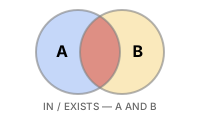
When a subquery can return multiple rows, use IN instead of =.
-- Customers who have left a 1-star review
SELECT name, email, grade
FROM customers
WHERE id IN (
    SELECT DISTINCT customer_id
    FROM reviews
    WHERE rating = 1
)
ORDER BY name;
Result:
| name | grade | |
|---|---|---|
| Adam Mcdaniel | user3712@testmail.kr | BRONZE |
| Adam Moore | user3@testmail.kr | VIP |
| Alan Newman | user1516@testmail.kr | VIP |
| Alejandro Waller | user1176@testmail.kr | GOLD |
| Alexandria Hicks | user1818@testmail.kr | BRONZE |
| Alicia Frey | user3259@testmail.kr | VIP |
| Allen Snyder | user226@testmail.kr | VIP |
| Allen West | user2493@testmail.kr | GOLD |
| ... | ... | ... |
-- Active products currently in shopping carts
SELECT name, price, stock_qty
FROM products
WHERE id IN (
    SELECT DISTINCT product_id
    FROM cart_items
)
  AND is_active = 1
ORDER BY name;
NOT IN
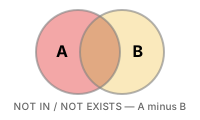
NOT IN finds rows that are not in the subquery result -- similar to the LEFT JOIN ... IS NULL anti-join pattern.
-- Products that have never been ordered
SELECT name, price
FROM products
WHERE id NOT IN (
    SELECT DISTINCT product_id
    FROM order_items
)
  AND is_active = 1;
Warning: If the subquery returns even one NULL value,
NOT INbehaves unexpectedly (returning no rows at all). When NULLs may be present, useNOT EXISTS(Lesson 20) instead.
FROM Subqueries (Derived Tables)
A subquery in the FROM clause creates a temporary inline table. This is called a derived table or inline view.
-- Average order amount by customer grade
SELECT
    grade,
    ROUND(AVG(avg_order), 2) AS avg_order_value
FROM (
    SELECT
        c.grade,
        o.customer_id,
        AVG(o.total_amount) AS avg_order
    FROM orders AS o
    INNER JOIN customers AS c ON o.customer_id = c.id
    WHERE o.status NOT IN ('cancelled', 'returned')
    GROUP BY c.grade, o.customer_id
) AS customer_avgs
GROUP BY grade
ORDER BY avg_order_value DESC;
Result:
| grade | avg_order_value |
|---|---|
| VIP | 1430749.76 |
| GOLD | 1115867.67 |
| SILVER | 881870.78 |
| BRONZE | 690005.82 |
-- Top 3 months by revenue with order count
SELECT
    monthly.year_month,
    monthly.revenue,
    monthly.order_count
FROM (
    SELECT
        SUBSTR(ordered_at, 1, 7) AS year_month,
        SUM(total_amount)        AS revenue,
        COUNT(*)                 AS order_count
    FROM orders
    WHERE status NOT IN ('cancelled', 'returned')
    GROUP BY SUBSTR(ordered_at, 1, 7)
) AS monthly
ORDER BY revenue DESC
LIMIT 3;
SELECT
    monthly.year_month,
    monthly.revenue,
    monthly.order_count
FROM (
    SELECT
        DATE_FORMAT(ordered_at, '%Y-%m') AS year_month,
        SUM(total_amount)                AS revenue,
        COUNT(*)                         AS order_count
    FROM orders
    WHERE status NOT IN ('cancelled', 'returned')
    GROUP BY DATE_FORMAT(ordered_at, '%Y-%m')
) AS monthly
ORDER BY revenue DESC
LIMIT 3;
SELECT
    monthly.year_month,
    monthly.revenue,
    monthly.order_count
FROM (
    SELECT
        TO_CHAR(ordered_at, 'YYYY-MM') AS year_month,
        SUM(total_amount)              AS revenue,
        COUNT(*)                       AS order_count
    FROM orders
    WHERE status NOT IN ('cancelled', 'returned')
    GROUP BY TO_CHAR(ordered_at, 'YYYY-MM')
) AS monthly
ORDER BY revenue DESC
LIMIT 3;
Result:
| year_month | revenue | order_count |
|---|---|---|
| 2024-12 | 1841293.70 | 892 |
| 2023-12 | 1624817.40 | 801 |
| 2024-11 | 1312944.90 | 703 |
Scalar Subqueries in SELECT
A subquery in the SELECT list executes once for each output row.
-- Most recent order date for each customer
SELECT
    c.name,
    c.grade,
    (
        SELECT MAX(ordered_at)
        FROM orders
        WHERE customer_id = c.id
    ) AS last_order_date
FROM customers AS c
WHERE c.is_active = 1
ORDER BY last_order_date DESC
LIMIT 8;
Result:
| name | grade | last_order_date |
|---|---|---|
| Angel Jones | BRONZE | 2025-12-31 22:25:39 |
| Carla Watson | GOLD | 2025-12-31 21:40:27 |
| Martin Hanson | SILVER | 2025-12-31 20:00:48 |
| Lucas Johnson | BRONZE | 2025-12-31 18:43:56 |
| Adam Moore | BRONZE | 2025-12-31 18:00:24 |
| Justin Murphy | VIP | 2025-12-31 15:43:23 |
| Sara Hill | GOLD | 2025-12-31 15:33:05 |
| David York | GOLD | 2025-12-31 15:08:54 |
| ... | ... | ... |
Scalar subqueries in
SELECTexecute per row, so they can be slow on large tables. When performance matters, useLEFT JOINwith aggregation instead.
Summary
| Concept | Description | Example |
|---|---|---|
| Scalar subquery | Subquery that returns a single value | WHERE price > (SELECT AVG(price) ...) |
| IN subquery | Subquery returning multiple values to check membership | WHERE id IN (SELECT product_id ...) |
| NOT IN | Find rows not in the subquery result (watch for NULLs) | WHERE id NOT IN (SELECT ...) |
| Derived table (FROM) | Create a temporary inline table in the FROM clause | FROM (SELECT ... GROUP BY ...) AS sub |
| SELECT scalar | Calculate a value per row in the SELECT list | (SELECT MAX(ordered_at) ...) AS last_order |
| Correlated subquery | Subquery that references a value from the outer query | WHERE p2.category_id = p.category_id |
Lesson Review Problems
These are simple problems to immediately test the concepts from this lesson. For comprehensive practice combining multiple concepts, see the Practice Problems section.
Practice Problems
Problem 1
Find orders that have never had a completed payment. Use a NOT IN subquery to exclude order_ids from the payments table where status = 'completed'. Return order_number, total_amount, status, sorted by total_amount descending, limited to 10 rows.
Answer
SELECT order_number, total_amount, status
FROM orders
WHERE id NOT IN (
    SELECT order_id
    FROM payments
    WHERE status = 'completed'
)
ORDER BY total_amount DESC
LIMIT 10;
Result (example):
| order_number | total_amount | status |
|---|---|---|
| ORD-20230523-22331 | 46094971.0 | cancelled |
| ORD-20221231-20394 | 43585700.0 | cancelled |
| ORD-20211112-14229 | 20640700.0 | cancelled |
| ORD-20200316-05860 | 19280300.0 | return_requested |
| ORD-20250424-33207 | 19179500.0 | return_requested |
| ORD-20250307-32312 | 18229600.0 | cancelled |
| ORD-20190519-03402 | 15130700.0 | returned |
| ORD-20250924-35599 | 14735700.0 | cancelled |
| ... | ... | ... |
Problem 2
Query orders with amounts greater than the overall average order amount. Return order_number, total_amount, sorted by total_amount descending, limited to 10 rows. Use a scalar subquery in the WHERE clause.
Answer
SELECT order_number, total_amount
FROM orders
WHERE total_amount > (
    SELECT AVG(total_amount) FROM orders
)
ORDER BY total_amount DESC
LIMIT 10;
Result (example):
| order_number | total_amount |
|---|---|
| ORD-20201121-08810 | 50867500.0 |
| ORD-20250305-32265 | 46820024.0 |
| ORD-20230523-22331 | 46094971.0 |
| ORD-20200209-05404 | 43677500.0 |
| ORD-20221231-20394 | 43585700.0 |
| ORD-20251218-37240 | 38626400.0 |
| ORD-20220106-15263 | 37987600.0 |
| ORD-20200820-07684 | 37518200.0 |
| ... | ... |
Problem 3
Use a scalar subquery in the SELECT clause to find each product's name and its review count. Return product_name, price, review_count, sorted by review_count descending, limited to 10 rows. Only include active products.
Answer
SELECT
    p.name  AS product_name,
    p.price,
    (
        SELECT COUNT(*)
        FROM reviews AS r
        WHERE r.product_id = p.id
    ) AS review_count
FROM products AS p
WHERE p.is_active = 1
ORDER BY review_count DESC
LIMIT 10;
Result (example):
| product_name | price | review_count |
|---|---|---|
| SteelSeries Prime Wireless Silver | 95900.0 | 105 |
| Kingston FURY Beast DDR4 16GB Silver | 48000.0 | 102 |
| Logitech G502 X PLUS | 97500.0 | 101 |
| SteelSeries Aerox 5 Wireless Silver | 100000.0 | 100 |
| Ducky One 3 TKL White | 189100.0 | 89 |
| Samsung SPA-KFG0BUB Silver | 21900.0 | 82 |
| SteelSeries Prime Wireless Black | 89800.0 | 80 |
| Crucial T700 2TB Silver | 257000.0 | 77 |
| ... | ... | ... |
Problem 4
Find all products priced above the average price within their own category. Use a correlated scalar subquery in the WHERE clause that references the outer query's category_id. Return product_name, price, category_id.
Answer
SELECT
    p.name        AS product_name,
    p.price,
    p.category_id
FROM products AS p
WHERE p.price > (
    SELECT AVG(p2.price)
    FROM products AS p2
    WHERE p2.category_id = p.category_id
      AND p2.is_active = 1
)
  AND p.is_active = 1
ORDER BY p.category_id, p.price DESC;
Result (example):
| product_name | price | category_id |
|---|---|---|
| LG All-in-One PC 27V70Q Silver | 1093200.0 | 2 |
| ASUS ROG Strix G16CH White | 3671500.0 | 3 |
| ASUS ROG Strix GT35 | 3296800.0 | 3 |
| ASUS ROG Strix G16CH Silver | 1879100.0 | 3 |
| Jooyon Rionine i9 High-End | 1849900.0 | 3 |
| ASUS ExpertBook B5 [Special Limited Edition] RGB lighting equipped, software customization supported | 2121600.0 | 6 |
| HP EliteBook 840 G10 Black [Special Limited Edition] Extended 3-year warranty + exclusive carrying case included | 2080300.0 | 6 |
| ASUS ExpertBook B5 White | 2068800.0 | 6 |
| ... | ... | ... |
Problem 5
Find products that are in at least one customer's wishlist but have never been ordered. Use IN and NOT IN subqueries and return product_name and price.
Answer
SELECT name AS product_name, price
FROM products
WHERE id IN (
    SELECT DISTINCT product_id FROM wishlists
)
  AND id NOT IN (
    SELECT DISTINCT product_id FROM order_items
)
ORDER BY price DESC;
Result (example):
| product_name | price |
|---|---|
| 삼성 오디세이 OLED G8 | 693300 |
| ASRock X870E Taichi 실버 | 583500 |
| 보스 SoundLink Flex 블랙 | 516000 |
| MSI MAG B860 TOMAHAWK WIFI | 440900 |
| be quiet! Dark Power 13 1000W | 359500 |
| ... | ... |
Problem 6
Use a FROM subquery to first calculate the average product price per category, then join with the categories table in the outer query to return category_name and avg_price. Sort by avg_price descending.
Answer
SELECT
    cat.name       AS category_name,
    price_stats.avg_price
FROM (
    SELECT
        category_id,
        ROUND(AVG(price), 2) AS avg_price
    FROM products
    WHERE is_active = 1
    GROUP BY category_id
) AS price_stats
INNER JOIN categories AS cat ON price_stats.category_id = cat.id
ORDER BY price_stats.avg_price DESC;
Result (example):
| category_name | avg_price |
|---|---|
| MacBook | 5481100.0 |
| Gaming Laptop | 2887583.33 |
| NVIDIA | 2207600.0 |
| Custom Build | 1836466.67 |
| General Laptop | 1794812.5 |
| Professional Monitor | 1492983.33 |
| 2-in-1 | 1417242.86 |
| AMD | 1214266.67 |
| ... | ... |
Problem 7
VIP' grade customers. Use an IN subquery and return product_name and price. Sort by price descending.
Answer
SELECT p.name AS product_name, p.price
FROM products AS p
WHERE p.id IN (
    SELECT DISTINCT oi.product_id
    FROM order_items AS oi
    INNER JOIN orders AS o ON oi.order_id = o.id
    INNER JOIN customers AS c ON o.customer_id = c.id
    WHERE c.grade = 'VIP'
)
ORDER BY p.price DESC;
Result (example):
| product_name | price |
|---|---|
| MacBook Air 15 M3 Silver | 5481100.0 |
| ASUS TUF Gaming RTX 5080 White | 4526600.0 |
| ASUS Dual RTX 5070 Ti [Special Limited Edition] Low-noise design, energy efficiency rated, eco-friendly packaging | 4496700.0 |
| Razer Blade 18 Black | 4353100.0 |
| Razer Blade 16 Silver | 3702900.0 |
| ASUS ROG Strix G16CH White | 3671500.0 |
| ASUS ROG Zephyrus G16 | 3429900.0 |
| ASUS ROG Strix GT35 | 3296800.0 |
| ... | ... |
Problem 8
Use a FROM subquery to find the top 10 customers by number of completed orders. Count orders per customer in the inner query, then join with the customers table in the outer query to add name and grade.
Answer
SELECT
    c.name,
    c.grade,
    order_stats.order_count,
    order_stats.total_spent
FROM (
    SELECT
        customer_id,
        COUNT(*)            AS order_count,
        SUM(total_amount)   AS total_spent
    FROM orders
    WHERE status IN ('delivered', 'confirmed')
    GROUP BY customer_id
) AS order_stats
INNER JOIN customers AS c ON order_stats.customer_id = c.id
ORDER BY order_stats.order_count DESC
LIMIT 10;
Result (example):
| name | grade | order_count | total_spent |
|---|---|---|---|
| Jason Rivera | VIP | 340 | 362705631.0 |
| Allen Snyder | VIP | 302 | 403081258.0 |
| Gabriel Walters | VIP | 275 | 230165991.0 |
| Brenda Garcia | VIP | 249 | 253180338.0 |
| James Banks | VIP | 230 | 234708853.0 |
| Courtney Huff | VIP | 223 | 244604910.0 |
| Ronald Arellano | VIP | 219 | 235775349.0 |
| Michael Duncan | VIP | 188 | 184685776.0 |
| ... | ... | ... | ... |
Problem 9
Find customers whose order count exceeds the overall average order count per customer. Use a FROM subquery to first get the order count per customer, then use a scalar subquery in the WHERE clause to compare against the average. Return customer_id and order_count, sorted by order_count descending, limited to 10 rows.
Answer
SELECT
    customer_id,
    order_count
FROM (
    SELECT
        customer_id,
        COUNT(*) AS order_count
    FROM orders
    GROUP BY customer_id
) AS cust_orders
WHERE order_count > (
    SELECT AVG(cnt)
    FROM (
        SELECT COUNT(*) AS cnt
        FROM orders
        GROUP BY customer_id
    ) AS avg_calc
)
ORDER BY order_count DESC
LIMIT 10;
Result (example):
| customer_id | order_count |
|---|---|
| 97 | 366 |
| 226 | 328 |
| 98 | 307 |
| 162 | 266 |
| 227 | 246 |
| 356 | 237 |
| 549 | 234 |
| 259 | 199 |
| ... | ... |
Problem 10
Find the names, emails, and last order dates of the 5 most recently ordering customers. Use a FROM subquery to first get the latest order date (last_order) per customer, then join with the customers table in the outer query. Sort by last_order descending.
Answer
Scoring Guide
| Score | Next Step |
|---|---|
| 9-10 | Move on to Lesson 11: Date/Time Functions |
| 7-8 | Review the explanations for incorrect answers, then proceed |
| Half or fewer | Re-read this lesson |
| 3 or fewer | Start again from Lesson 9: LEFT JOIN |
Problem Areas:
| Area | Problems |
|---|---|
| NOT IN subquery | 1 |
| WHERE scalar subquery | 2 |
| SELECT scalar subquery | 3 |
| Correlated subquery | 4 |
| IN + NOT IN combination | 5 |
| FROM subquery (derived table) | 6, 8, 10 |
| IN subquery + JOIN | 7 |
| Nested subquery | 9 |