Lesson 20: EXISTS and Correlated Subqueries
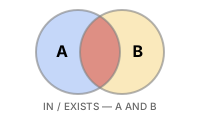
EXISTS checks whether a subquery returns at least one row. Unlike IN, it stops as soon as the first matching row is found, making it efficient for large datasets and safe in situations where NULL values may be present.
EXISTS executes the subquery for each row of the outer query and includes the row if a result exists.
Common real-world scenarios for using EXISTS:
- Finding missing data: Customers with no orders, products with no reviews (NOT EXISTS)
- Conditional existence checks: VIP customers with no recent orders (EXISTS + NOT EXISTS)
- Data integrity: FK integrity validation, detecting orphan records (NOT EXISTS)
- Universal negation: "Products purchased by every customer" (double NOT EXISTS)
Already familiar?
If you are comfortable with EXISTS, NOT EXISTS, and correlated subqueries, skip ahead to Lesson 21: SELF/CROSS JOIN.
EXISTS vs. IN
| Characteristic | IN |
EXISTS |
|---|---|---|
| Return value | Matching values | True/False |
| NULL safety | Not safe — NOT IN fails when NULL is present |
Safe |
| Short-circuit evaluation | None | Yes — stops at first match |
| Self-reference | Not possible | Possible — correlated subquery |
Basic EXISTS
-- Customers who have placed at least one order
SELECT id, name, grade
FROM customers AS c
WHERE EXISTS (
    SELECT 1
    FROM orders AS o
    WHERE o.customer_id = c.id
)
ORDER BY name
LIMIT 8;
When the inner query references c.id from the outer query, it is called a Correlated Subquery. It executes once for each outer row to check whether a matching order exists.
NOT EXISTS — Finding Missing Data
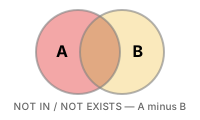
NOT EXISTS is a safe alternative to NOT IN when the subquery column may contain NULL values.
-- Customers who have never placed an order (safer than NOT IN)
SELECT id, name, email, created_at
FROM customers AS c
WHERE NOT EXISTS (
    SELECT 1
    FROM orders AS o
    WHERE o.customer_id = c.id
)
ORDER BY created_at DESC
LIMIT 10;
Result (example):
| id | name | created_at | |
|---|---|---|---|
| 4559 | Robert Simmons | user4559@testmail.kr | 2025-12-30 20:49:59 |
| 4853 | Olivia Watson | user4853@testmail.kr | 2025-12-30 18:50:02 |
| 5181 | Jennifer Mcgrath | user5181@testmail.kr | 2025-12-30 10:18:14 |
| 5225 | Nicholas Richardson | user5225@testmail.kr | 2025-12-30 06:02:53 |
| 4546 | Warren Olsen | user4546@testmail.kr | 2025-12-30 05:59:32 |
| 4887 | Bradley Daugherty | user4887@testmail.kr | 2025-12-30 05:43:21 |
| 5221 | Michael Moore | user5221@testmail.kr | 2025-12-29 17:18:36 |
| 4554 | Erin Pena | user4554@testmail.kr | 2025-12-29 05:52:39 |
| ... | ... | ... | ... |
-- Products on someone's wishlist but never purchased
SELECT p.id, p.name, p.price
FROM products AS p
WHERE EXISTS (
    SELECT 1 FROM wishlists AS w WHERE w.product_id = p.id
)
AND NOT EXISTS (
    SELECT 1 FROM order_items AS oi WHERE oi.product_id = p.id
)
ORDER BY p.price DESC;
Result (example):
| id | name | price |
|---|---|---|
| 260 | 삼성 오디세이 OLED G8 | 693300 |
| 277 | ASRock X870E Taichi 실버 | 583500 |
| ... | ... | ... |
Correlated Subqueries for Conditional Logic
Using a correlated subquery in the SELECT clause, you can check "does a related record exist?" for each row.
-- Show whether each customer has orders, reviews, and complaints
SELECT
    c.id,
    c.name,
    c.grade,
    CASE WHEN EXISTS (SELECT 1 FROM orders     WHERE customer_id = c.id) THEN 'Yes' ELSE 'No' END AS has_orders,
    CASE WHEN EXISTS (SELECT 1 FROM reviews    WHERE customer_id = c.id) THEN 'Yes' ELSE 'No' END AS has_reviews,
    CASE WHEN EXISTS (SELECT 1 FROM complaints WHERE customer_id = c.id) THEN 'Yes' ELSE 'No' END AS has_complaints
FROM customers AS c
WHERE c.grade IN ('VIP', 'GOLD')
ORDER BY c.name
LIMIT 8;
Result (example):
| id | name | grade | has_orders | has_reviews | has_complaints |
|---|---|---|---|---|---|
| 3365 | Aaron Gillespie | GOLD | Yes | Yes | Yes |
| 3282 | Aaron Medina | GOLD | Yes | No | Yes |
| 4969 | Aaron Powell | GOLD | Yes | Yes | No |
| 2324 | Aaron Ryan | GOLD | Yes | Yes | Yes |
| 4233 | Abigail Richardson | VIP | Yes | Yes | No |
| 2066 | Adam Johnson | VIP | Yes | Yes | Yes |
| 3 | Adam Moore | VIP | Yes | Yes | Yes |
| 789 | Adrian Davis | GOLD | Yes | Yes | Yes |
| ... | ... | ... | ... | ... | ... |
Multi-Condition EXISTS
-- Customers who both placed orders and filed complaints in 2024
SELECT c.id, c.name, c.grade
FROM customers AS c
WHERE EXISTS (
    SELECT 1
    FROM orders AS o
    WHERE o.customer_id = c.id
      AND o.ordered_at LIKE '2024%'
)
AND EXISTS (
    SELECT 1
    FROM complaints AS comp
    WHERE comp.customer_id = c.id
)
ORDER BY c.name;
Using EXISTS in HAVING (with Aggregation)
-- Categories that have at least one product with 50 or more reviews
SELECT
    cat.name    AS category,
    COUNT(p.id) AS product_count
FROM categories AS cat
INNER JOIN products AS p ON p.category_id = cat.id
GROUP BY cat.id, cat.name
HAVING EXISTS (
    SELECT 1
    FROM products  AS p2
    INNER JOIN reviews AS r ON r.product_id = p2.id
    WHERE p2.category_id = cat.id
    GROUP BY p2.id
    HAVING COUNT(r.id) >= 50
)
ORDER BY category;
How EXISTS Executes
To understand why EXISTS is efficient, you need to know its internal behavior.
Key: Short-circuit Evaluation
EXISTS: Stops as soon as the first matching row is found. Even if a customer has 100 orders, only 1 needs to be checked.IN: Collects the entire result of the subquery first, then compares. The difference is significant with large datasets.- Why use
SELECT 1: EXISTS only checks for the existence of rows, so there is no need to retrieve column values.SELECT *also works, butSELECT 1makes the intent clearer.
The NULL Trap with NOT IN
If the subquery result of NOT IN contains even one NULL, the entire result becomes empty. This is the primary reason to prefer NOT EXISTS.
-- ❌ Dangerous: if product_id has NULL, result is 0 rows!
SELECT name FROM products
WHERE id NOT IN (SELECT product_id FROM order_items);
-- If even one row has NULL product_id, all comparisons become UNKNOWN → no results

-- ✅ Safe: NOT EXISTS is not affected by NULL
SELECT name FROM products AS p
WHERE NOT EXISTS (
    SELECT 1 FROM order_items AS oi
    WHERE oi.product_id = p.id
);
Rule: Use
NOT EXISTSby default instead ofNOT IN. Especially when the subquery column may contain NULL, always useNOT EXISTS.
Anti-Join Pattern Comparison
"Finding rows that don't exist" can be implemented in three ways in SQL. Here is a comparison of the pros and cons.
| Pattern | Syntax | NULL Safe | Performance (large data) |
|---|---|---|---|
NOT EXISTS |
WHERE NOT EXISTS (SELECT 1 FROM ... WHERE ...) |
✅ | Fast |
LEFT JOIN + IS NULL |
LEFT JOIN ... WHERE right.id IS NULL |
✅ | Fast |
NOT IN |
WHERE col NOT IN (SELECT ...) |
❌ | Can be slow |
-- Method 1: NOT EXISTS (recommended)
SELECT c.name FROM customers AS c
WHERE NOT EXISTS (
    SELECT 1 FROM orders AS o WHERE o.customer_id = c.id
);

-- Method 2: LEFT JOIN + IS NULL (equivalent)
SELECT c.name FROM customers AS c
LEFT JOIN orders AS o ON o.customer_id = c.id
WHERE o.id IS NULL;

-- Method 3: NOT IN (NULL risk)
SELECT name FROM customers
WHERE id NOT IN (SELECT customer_id FROM orders);
All three queries return the same result, but NOT IN returns an empty result if customer_id contains NULL. In practice, use NOT EXISTS or LEFT JOIN + IS NULL.
Summary
| Concept | Description | Example |
|---|---|---|
| EXISTS | TRUE if subquery returns at least 1 row | WHERE EXISTS (SELECT 1 FROM ...) |
| NOT EXISTS | TRUE if subquery returns 0 rows | WHERE NOT EXISTS (SELECT 1 FROM ...) |
| Correlated subquery | Inner query references columns from the outer query | WHERE o.customer_id = c.id |
| Short-circuit evaluation | EXISTS stops immediately at first match | More efficient than IN for large data |
| NOT IN NULL trap | Entire result disappears when NULL is present | Replace with NOT EXISTS |
| Anti-join | 3 patterns for "finding what doesn't exist" | NOT EXISTS ≈ LEFT JOIN IS NULL > NOT IN |
| HAVING + EXISTS | Add existence conditions to aggregate results | Only groups meeting specific conditions |
Lesson Review Problems
These are simple problems to immediately test the concepts learned in this lesson. For comprehensive practice combining multiple concepts, see the Practice Problems section.
Practice Problems
Problem 1
Use NOT EXISTS to implement an anti-join to find orders where shipping has been created but delivery is not yet completed (delivered_at IS NULL). Return order_number, ordered_at, status, carrier, shipped_at.
Answer
SELECT
    o.order_number,
    o.ordered_at,
    o.status,
    s.carrier,
    s.shipped_at
FROM orders AS o
INNER JOIN shipping AS s ON s.order_id = o.id
WHERE NOT EXISTS (
    SELECT 1
    FROM shipping AS s2
    WHERE s2.order_id = o.id
      AND s2.delivered_at IS NOT NULL
)
ORDER BY s.shipped_at DESC
LIMIT 20;
Result (example):
| order_number | ordered_at | status | carrier | shipped_at |
|---|---|---|---|---|
| ORD-20251225-37402 | 2025-12-25 22:53:08 | shipped | OnTrac | 2025-12-28 22:53:08 |
| ORD-20251225-37410 | 2025-12-25 22:48:04 | shipped | USPS | 2025-12-28 22:48:04 |
| ORD-20251225-37403 | 2025-12-25 18:40:27 | shipped | DHL | 2025-12-28 18:40:27 |
| ORD-20251224-37398 | 2025-12-24 19:58:48 | shipped | DHL | 2025-12-27 19:58:48 |
| ORD-20251225-37408 | 2025-12-25 18:14:11 | shipped | FedEx | 2025-12-27 18:14:11 |
| ORD-20251225-37406 | 2025-12-25 17:53:34 | shipped | FedEx | 2025-12-27 17:53:34 |
| ORD-20251225-37416 | 2025-12-25 23:23:43 | shipped | UPS | 2025-12-26 23:23:43 |
| ORD-20251223-37362 | 2025-12-23 22:26:31 | shipped | DHL | 2025-12-26 22:26:31 |
| ... | ... | ... | ... | ... |
Problem 2
Use EXISTS with correlated subqueries to find products that have both a 5-star and a 1-star review. Return product_id, product_name, price.
Answer
SELECT
    p.id    AS product_id,
    p.name  AS product_name,
    p.price
FROM products AS p
WHERE EXISTS (
    SELECT 1 FROM reviews WHERE product_id = p.id AND rating = 5
)
AND EXISTS (
    SELECT 1 FROM reviews WHERE product_id = p.id AND rating = 1
)
ORDER BY p.name;
Result (example):
| product_id | product_name | price |
|---|---|---|
| 44 | AMD Ryzen 9 9900X | 335700.0 |
| 251 | AMD Ryzen 9 9900X | 591800.0 |
| 171 | APC Back-UPS Pro Gaming BGM1500B Black | 516300.0 |
| 140 | ASRock B850M Pro RS Black | 201000.0 |
| 47 | ASRock B850M Pro RS Silver | 665600.0 |
| 164 | ASRock B850M Pro RS White | 419600.0 |
| 149 | ASRock B860M Pro RS Silver | 351700.0 |
| 94 | ASRock B860M Pro RS White | 610100.0 |
| ... | ... | ... |
Problem 3
Use correlated subqueries to display the highest-value order information for each staff member. Return staff_name, department, max_order_amount, max_order_number. max_order_number is the order number matching that amount.
Answer
SELECT
    s.name AS staff_name,
    s.department,
    (SELECT MAX(o.total_amount) FROM orders AS o WHERE o.staff_id = s.id) AS max_order_amount,
    (SELECT o.order_number FROM orders AS o
     WHERE o.staff_id = s.id
     ORDER BY o.total_amount DESC
     LIMIT 1) AS max_order_number
FROM staff AS s
WHERE EXISTS (
    SELECT 1 FROM orders WHERE staff_id = s.id
)
ORDER BY max_order_amount DESC
LIMIT 15;
Problem 4
Use NOT EXISTS to find customers who have never written a review but have placed 5 or more orders. Return customer_id, name, grade, order_count.
Answer
SELECT
    c.id AS customer_id,
    c.name,
    c.grade,
    (SELECT COUNT(*) FROM orders WHERE customer_id = c.id
        AND status NOT IN ('cancelled', 'returned')) AS order_count
FROM customers AS c
WHERE NOT EXISTS (
    SELECT 1 FROM reviews WHERE customer_id = c.id
)
AND (
    SELECT COUNT(*) FROM orders WHERE customer_id = c.id
        AND status NOT IN ('cancelled', 'returned')
) >= 5
ORDER BY order_count DESC
LIMIT 20;
Result (example):
| customer_id | name | grade | order_count |
|---|---|---|---|
| 494 | Amanda Smith | GOLD | 22 |
| 124 | Paul Wilson | BRONZE | 13 |
| 2164 | Kristy Nguyen | SILVER | 13 |
| 1207 | Kevin Garcia | SILVER | 12 |
| 1620 | Alexander Aguirre | BRONZE | 12 |
| 2236 | Kayla Davis | BRONZE | 12 |
| 2487 | Larry Kim | BRONZE | 12 |
| 3393 | Claudia Buck DDS | GOLD | 11 |
| ... | ... | ... | ... |
Problem 5
Use EXISTS to find customers who have paid at least once with every payment method (credit_card, bank_transfer, cash, etc.). Return customer_id, name. Hint: Compare the number of payment method types with the number of methods used by each customer.
Answer
SELECT c.id AS customer_id, c.name
FROM customers AS c
WHERE NOT EXISTS (
    SELECT DISTINCT p2.method
    FROM payments AS p2
    WHERE p2.status = 'completed'

    EXCEPT

    SELECT p.method
    FROM payments AS p
    INNER JOIN orders AS o ON p.order_id = o.id
    WHERE o.customer_id = c.id
      AND p.status = 'completed'
)
AND EXISTS (
    SELECT 1
    FROM orders AS o
    WHERE o.customer_id = c.id
)
ORDER BY c.name;
Result (example):
| customer_id | name |
|---|---|
| 1492 | 강도윤 |
| 162 | 강명자 |
| 2129 | 강미숙 |
| 1516 | 강민재 |
| 912 | 강서현 |
| ... | ... |
Problem 6
Combine EXISTS with aggregate conditions to find categories that have at least one product with an average review rating of 4.0 or higher. Return category_name, product_count.
Answer
SELECT
    cat.name AS category_name,
    COUNT(p.id) AS product_count
FROM categories AS cat
INNER JOIN products AS p ON p.category_id = cat.id
WHERE p.is_active = 1
GROUP BY cat.id, cat.name
HAVING EXISTS (
    SELECT 1
    FROM products AS p2
    INNER JOIN reviews AS r ON r.product_id = p2.id
    WHERE p2.category_id = cat.id
    GROUP BY p2.id
    HAVING AVG(r.rating) >= 4.0
)
ORDER BY category_name;
Result (example):
| category_name | product_count |
|---|---|
| 2-in-1 | 7 |
| AMD | 2 |
| AMD | 6 |
| AMD Socket | 9 |
| Air Cooling | 5 |
| Barebone | 1 |
| Case | 10 |
| Custom Build | 9 |
| ... | ... |
Problem 7
Find all wishlist products that the customer has not yet purchased. Return customer_name, product_name, created_at (wishlist registration date). Use NOT EXISTS with a correlated subquery that checks for matching customer_id and product_id in order_items and orders.
Answer
SELECT
    c.name  AS customer_name,
    p.name  AS product_name,
    w.created_at
FROM wishlists AS w
INNER JOIN customers AS c ON w.customer_id = c.id
INNER JOIN products  AS p ON w.product_id  = p.id
WHERE NOT EXISTS (
    SELECT 1
    FROM order_items AS oi
    INNER JOIN orders AS o ON oi.order_id = o.id
    WHERE o.customer_id  = w.customer_id
      AND oi.product_id  = w.product_id
      AND o.status NOT IN ('cancelled', 'returned')
)
ORDER BY w.created_at DESC
LIMIT 20;
Result (example):
| customer_name | product_name | created_at |
|---|---|---|
| Olivia Watson | Jooyon Rionine Mini PC | 2025-12-30 19:11:10 |
| Kyle Ferguson | Samsung Galaxy Book4 360 Black | 2025-12-30 17:42:08 |
| James Mcgrath | TP-Link TL-SG108 | 2025-12-30 11:47:20 |
| Nathaniel Martinez | Seagate IronWolf 4TB Black | 2025-12-30 10:41:18 |
| Bryan Powers | SK hynix Platinum P41 2TB Black | 2025-12-30 10:16:54 |
| Warren Olsen | TeamGroup T-Force Vulcan DDR5 32GB 5200MHz | 2025-12-30 09:25:54 |
| Alexander Logan | APC Back-UPS Pro Gaming BGM1500B Black | 2025-12-30 06:38:37 |
| Kevin Rivera | Hancom Office 2024 Enterprise Silver | 2025-12-30 05:38:13 |
| ... | ... | ... |
Problem 8
Use NOT EXISTS to find products that were purchased in common by every customer who ordered in 2024. In other words, products where not a single customer who ordered in 2024 failed to purchase them. Return product_id, product_name.
Answer
SELECT p.id AS product_id, p.name AS product_name
FROM products AS p
WHERE NOT EXISTS (
    SELECT c.id
    FROM customers AS c
    WHERE EXISTS (
        SELECT 1 FROM orders AS o
        WHERE o.customer_id = c.id
          AND o.ordered_at LIKE '2024%'
          AND o.status NOT IN ('cancelled', 'returned')
    )
    AND NOT EXISTS (
        SELECT 1
        FROM order_items AS oi
        INNER JOIN orders AS o ON oi.order_id = o.id
        WHERE o.customer_id = c.id
          AND oi.product_id = p.id
          AND o.ordered_at LIKE '2024%'
          AND o.status NOT IN ('cancelled', 'returned')
    )
)
ORDER BY p.name;
Problem 9
Find customers who have both filed complaints and have return history. Return customer_id, name, grade, complaint_count, return_count. Use EXISTS for filtering, and use subquery aggregation or JOINs for counting.
Answer
SELECT
    c.id    AS customer_id,
    c.name,
    c.grade,
    (SELECT COUNT(*) FROM complaints WHERE customer_id = c.id) AS complaint_count,
    (SELECT COUNT(*) FROM orders AS o
                    INNER JOIN returns AS r ON r.order_id = o.id
                    WHERE o.customer_id = c.id)               AS return_count
FROM customers AS c
WHERE EXISTS (
    SELECT 1 FROM complaints WHERE customer_id = c.id
)
AND EXISTS (
    SELECT 1
    FROM orders AS o
    INNER JOIN returns AS r ON r.order_id = o.id
    WHERE o.customer_id = c.id
)
ORDER BY complaint_count DESC;
Result (example):
| customer_id | name | grade | complaint_count | return_count |
|---|---|---|---|---|
| 98 | Gabriel Walters | VIP | 29 | 15 |
| 97 | Jason Rivera | VIP | 25 | 10 |
| 162 | Brenda Garcia | VIP | 24 | 1 |
| 226 | Allen Snyder | VIP | 19 | 9 |
| 356 | Courtney Huff | VIP | 19 | 3 |
| 549 | Ronald Arellano | VIP | 19 | 6 |
| 517 | April Rasmussen | SILVER | 18 | 4 |
| 1355 | Robert Williams | GOLD | 18 | 6 |
| ... | ... | ... | ... | ... |
Problem 10
Use EXISTS to find customers who have ordered products from at least 3 different categories. Return customer_id, name, category_count, sorted by category_count descending, limited to 10 rows.
Answer
SELECT
    c.id AS customer_id,
    c.name,
    (
        SELECT COUNT(DISTINCT p.category_id)
        FROM order_items AS oi
        INNER JOIN orders AS o ON oi.order_id = o.id
        INNER JOIN products AS p ON oi.product_id = p.id
        WHERE o.customer_id = c.id
    ) AS category_count
FROM customers AS c
WHERE EXISTS (
    SELECT 1
    FROM order_items AS oi
    INNER JOIN orders AS o ON oi.order_id = o.id
    INNER JOIN products AS p ON oi.product_id = p.id
    WHERE o.customer_id = c.id
    GROUP BY o.customer_id
    HAVING COUNT(DISTINCT p.category_id) >= 3
)
ORDER BY category_count DESC
LIMIT 10;
Scoring Guide
| Score | Next Step |
|---|---|
| 9-10 | Move to Lesson 21: SELF/CROSS JOIN |
| 7-8 | Review the explanations for incorrect answers, then proceed |
| Half or less | Re-read this lesson |
| 3 or fewer | Start again from Lesson 19: CTE |
Problem Areas:
| Area | Problems |
|---|---|
| NOT EXISTS (anti-join) | 1, 4, 7 |
| EXISTS + correlated subquery | 2, 5, 6 |
| Correlated subquery (scalar) | 3 |
| NOT EXISTS (universal negation) | 8 |
| EXISTS + multiple conditions | 9, 10 |