Lesson 9: LEFT JOIN and Outer Joins
In Lesson 8, we connected two tables with INNER JOIN. However, INNER JOIN only returns rows where data exists on both sides. What if you need to find 'customers with no orders' or 'products with no reviews'? That's where LEFT JOIN comes in.
Already familiar?
If you're comfortable with LEFT JOIN, RIGHT JOIN, and FULL OUTER JOIN, skip ahead to Lesson 10: Subqueries.
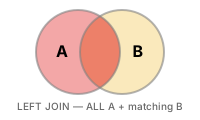
LEFT JOIN returns all rows from the left table and brings matching rows from the right table. If there is no match, the right-side columns are filled with NULL. This is an essential technique for finding rows without related records and is used very frequently in practice.
LEFT JOIN keeps all rows from the left table. If there's no match on the right, the values are filled with NULL.
Basic LEFT JOIN
-- Query all products regardless of whether they have reviews
SELECT
    p.name          AS product_name,
    p.price,
    r.rating,
    r.created_at    AS reviewed_at
FROM products AS p
LEFT JOIN reviews AS r ON p.id = r.product_id
ORDER BY p.name
LIMIT 8;
Result:
| product_name | price | rating | reviewed_at |
|---|---|---|---|
| AMD Ryzen 9 9900X | 335700.0 | 1 | 2023-01-14 16:31:09 |
| AMD Ryzen 9 9900X | 335700.0 | 1 | 2025-08-08 21:20:16 |
| AMD Ryzen 9 9900X | 335700.0 | 2 | 2019-04-09 14:20:54 |
| AMD Ryzen 9 9900X | 335700.0 | 2 | 2020-04-21 19:29:28 |
| AMD Ryzen 9 9900X | 335700.0 | 2 | 2020-05-17 12:03:14 |
| AMD Ryzen 9 9900X | 335700.0 | 2 | 2020-08-28 19:46:37 |
| AMD Ryzen 9 9900X | 335700.0 | 2 | 2020-09-28 21:47:12 |
| AMD Ryzen 9 9900X | 335700.0 | 2 | 2020-11-06 20:03:53 |
| ... | ... | ... | ... |
Products like ASUS TUF Gaming Laptop and Belkin USB-C Hub have no reviews, so rating and reviewed_at are NULL.
Finding Unmatched Rows
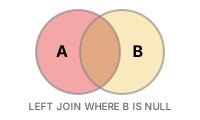
Anti-join pattern: add WHERE right_table.id IS NULL after a LEFT JOIN. This finds rows in the left table that have no corresponding row in the right table.
-- Products that have never received a review
SELECT
    p.id,
    p.name,
    p.price
FROM products AS p
LEFT JOIN reviews AS r ON p.id = r.product_id
WHERE r.id IS NULL
ORDER BY p.name;
Result:
| id | name | price |
|---|---|---|
| 25 | Hansung BossMonster DX5800 Black | 1129400.0 |
| 279 | MSI Radeon RX 9070 XT GAMING X | 1896000.0 |
-- Customers who have never placed an order
SELECT
    c.id,
    c.name,
    c.email,
    c.created_at
FROM customers AS c
LEFT JOIN orders AS o ON c.id = o.customer_id
WHERE o.id IS NULL
ORDER BY c.created_at DESC
LIMIT 10;
Result:
| id | name | created_at | |
|---|---|---|---|
| 4559 | Robert Simmons | user4559@testmail.kr | 2025-12-30 20:49:59 |
| 4853 | Olivia Watson | user4853@testmail.kr | 2025-12-30 18:50:02 |
| 5181 | Jennifer Mcgrath | user5181@testmail.kr | 2025-12-30 10:18:14 |
| 5225 | Nicholas Richardson | user5225@testmail.kr | 2025-12-30 06:02:53 |
| 4546 | Warren Olsen | user4546@testmail.kr | 2025-12-30 05:59:32 |
| 4887 | Bradley Daugherty | user4887@testmail.kr | 2025-12-30 05:43:21 |
| 5221 | Michael Moore | user5221@testmail.kr | 2025-12-29 17:18:36 |
| 4554 | Erin Pena | user4554@testmail.kr | 2025-12-29 05:52:39 |
| ... | ... | ... | ... |
These customers likely signed up recently and haven't made a purchase yet.
LEFT JOIN with Aggregation
To count only matched rows, use COUNT(right_table.id) instead of COUNT(*) -- NULLs are not included in the count.
-- Review count and average rating for all products
SELECT
    p.name          AS product_name,
    p.price,
    COUNT(r.id)     AS review_count,
    ROUND(AVG(r.rating), 2) AS avg_rating
FROM products AS p
LEFT JOIN reviews AS r ON p.id = r.product_id
WHERE p.is_active = 1
GROUP BY p.id, p.name, p.price
ORDER BY review_count DESC
LIMIT 10;
Result:
| product_name | price | review_count | avg_rating |
|---|---|---|---|
| SteelSeries Prime Wireless Silver | 95900.0 | 105 | 3.88 |
| Kingston FURY Beast DDR4 16GB Silver | 48000.0 | 102 | 3.75 |
| Logitech G502 X PLUS | 97500.0 | 101 | 4.18 |
| SteelSeries Aerox 5 Wireless Silver | 100000.0 | 100 | 3.88 |
| Ducky One 3 TKL White | 189100.0 | 89 | 3.81 |
| Samsung SPA-KFG0BUB Silver | 21900.0 | 82 | 4.1 |
| SteelSeries Prime Wireless Black | 89800.0 | 80 | 3.88 |
| Crucial T700 2TB Silver | 257000.0 | 77 | 4.21 |
| ... | ... | ... | ... |
-- Per-customer order statistics including customers with 0 orders
SELECT
    c.name,
    c.grade,
    COUNT(o.id)         AS order_count,
    COALESCE(SUM(o.total_amount), 0) AS lifetime_value
FROM customers AS c
LEFT JOIN orders AS o ON c.id = o.customer_id
    AND o.status NOT IN ('cancelled', 'returned')
GROUP BY c.id, c.name, c.grade
ORDER BY lifetime_value DESC
LIMIT 8;
Notice that the additional
ANDcondition is placed in theONclause rather thanWHERE. Placing it inWHEREwould exclude customers with no orders from the result.
Result:
| name | grade | order_count | lifetime_value |
|---|---|---|---|
| Allen Snyder | VIP | 307 | 407119725.0 |
| Jason Rivera | VIP | 346 | 375955231.0 |
| Ronald Arellano | VIP | 220 | 255055649.0 |
| Brenda Garcia | VIP | 249 | 253180338.0 |
| Courtney Huff | VIP | 226 | 248498783.0 |
| Gabriel Walters | VIP | 283 | 239477591.0 |
| James Banks | VIP | 232 | 237513053.0 |
| David York | GOLD | 163 | 207834908.0 |
| ... | ... | ... | ... |
Chaining Multiple LEFT JOINs
-- Query orders with optional shipping and payment info
SELECT
    o.order_number,
    o.status,
    o.total_amount,
    s.carrier,
    s.tracking_number,
    p.method         AS payment_method
FROM orders AS o
LEFT JOIN shipping AS s ON s.order_id = o.id
LEFT JOIN payments AS p ON p.order_id = o.id
WHERE o.ordered_at LIKE '2024-12%'
LIMIT 5;
RIGHT JOIN
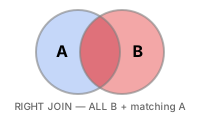
RIGHT JOIN is the opposite of LEFT JOIN. It keeps all rows from the right table and fills with NULL when there's no match on the left.
-- RIGHT JOIN: Include customers with no orders
SELECT
    c.name,
    c.email,
    o.order_number,
    o.total_amount
FROM orders AS o
RIGHT JOIN customers AS c ON c.id = o.customer_id
ORDER BY c.name
LIMIT 10;
In practice, RIGHT JOIN is rarely used. You can get the same result by swapping the table order and using LEFT JOIN:
-- Same result with LEFT JOIN
SELECT
    c.name,
    c.email,
    o.order_number,
    o.total_amount
FROM customers AS c
LEFT JOIN orders AS o ON c.id = o.customer_id
ORDER BY c.name
LIMIT 10;
Both queries return the same result. LEFT JOIN is more intuitive, so most teams prefer it.
FULL OUTER JOIN
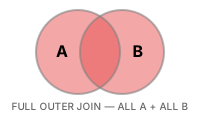
FULL OUTER JOIN keeps all rows from both tables. If there's no match on either side, the values are filled with NULL. This is useful when you need to simultaneously find customers without orders and orders without customer information.
Support for FULL OUTER JOIN varies by database:
SQLite 3.39.0 (2022-07-21) and above supports FULL OUTER JOIN directly:
-- SQLite 3.39+ : Use FULL OUTER JOIN directly
SELECT
    c.name,
    c.email,
    o.order_number,
    o.total_amount
FROM customers AS c
FULL OUTER JOIN orders AS o ON c.id = o.customer_id
ORDER BY c.name
LIMIT 15;
If you need compatibility with older versions, you can use the LEFT JOIN + UNION ALL pattern instead:
-- SQLite 3.38 and below: LEFT JOIN UNION ALL
SELECT
    c.name,
    c.email,
    o.order_number,
    o.total_amount
FROM customers AS c
LEFT JOIN orders AS o ON c.id = o.customer_id

UNION ALL

SELECT
    NULL    AS name,
    NULL    AS email,
    o.order_number,
    o.total_amount
FROM orders AS o
LEFT JOIN customers AS c ON c.id = o.customer_id
WHERE c.id IS NULL
ORDER BY name
LIMIT 15;
MySQL does not support FULL OUTER JOIN. Use LEFT JOIN and RIGHT JOIN combined with UNION instead:
-- MySQL: LEFT JOIN UNION RIGHT JOIN
SELECT
    c.name,
    c.email,
    o.order_number,
    o.total_amount
FROM customers AS c
LEFT JOIN orders AS o ON c.id = o.customer_id

UNION

SELECT
    c.name,
    c.email,
    o.order_number,
    o.total_amount
FROM customers AS c
RIGHT JOIN orders AS o ON c.id = o.customer_id
ORDER BY name
LIMIT 15;
Summary
| Concept | Description | Example |
|---|---|---|
| LEFT JOIN | Keeps all rows from left table, NULL for unmatched | FROM products LEFT JOIN reviews ON ... |
| Anti-join | LEFT JOIN + WHERE IS NULL to find unmatched rows | WHERE r.id IS NULL |
| LEFT JOIN + aggregation | COUNT(right.id) to exclude NULLs from count | COUNT(r.id) AS review_count |
| ON vs WHERE | ON preserves LEFT rows, WHERE excludes them | LEFT JOIN orders ON ... AND o.status = 'delivered' |
| RIGHT JOIN | Keeps all rows from right table (opposite of LEFT JOIN) | FROM orders RIGHT JOIN customers ON ... |
| FULL OUTER JOIN | Keeps all rows from both sides, NULL on either side for unmatched | FULL OUTER JOIN orders ON ... |
Lesson Review Problems
These are simple problems to immediately test the concepts from this lesson. For comprehensive practice combining multiple concepts, see the Practice Problems section.
Practice Problems
Problem 1
Include all customers without orders and orders without customer information. Query customer_name, order_number, total_amount. Display '(unknown)' for missing customers and '(no order)' for missing orders. Sort by customer_name ascending and return up to 15 rows.
Answer
SELECT
    COALESCE(c.name, '(unknown)')       AS customer_name,
    COALESCE(o.order_number, '(no order)') AS order_number,
    o.total_amount
FROM customers AS c
LEFT JOIN orders AS o ON c.id = o.customer_id

UNION

SELECT
    COALESCE(c.name, '(unknown)')       AS customer_name,
    COALESCE(o.order_number, '(no order)') AS order_number,
    o.total_amount
FROM customers AS c
RIGHT JOIN orders AS o ON c.id = o.customer_id
ORDER BY customer_name
LIMIT 15;
Problem 2
Find the number of customers who have never left a review. Return a single value named no_review_customers.
Answer
SELECT COUNT(*) AS no_review_customers
FROM customers AS c
LEFT JOIN reviews AS r ON c.id = r.customer_id
WHERE r.id IS NULL;
Result (example):
| no_review_customers |
|---|
| 3331 |
Problem 3
Find all active products that have no inventory transactions in the inventory_transactions table. Return product_id, name, stock_qty.
Answer
Problem 4
For all categories, find the category name and the number of products (product_count) in each category. Include categories with zero products and display 0 for them. Sort by product_count descending, then by category name ascending.
Answer
SELECT
    cat.name        AS category_name,
    COUNT(p.id)     AS product_count
FROM categories AS cat
LEFT JOIN products AS p ON cat.id = p.category_id
GROUP BY cat.id, cat.name
ORDER BY product_count DESC, category_name ASC;
Result (example):
| category_name | product_count |
|---|---|
| Intel Socket | 13 |
| Power Supply (PSU) | 13 |
| Speakers/Headsets | 12 |
| Case | 11 |
| Custom Build | 11 |
| Mechanical | 11 |
| Membrane | 11 |
| AMD Socket | 10 |
| ... | ... |
Problem 5
Using a RIGHT JOIN with the orders table as the left side, find all customers' names (name) and order counts (order_count). Include customers with no orders, and sort by order count descending, limited to 10 rows.
Answer
SELECT
    c.name,
    COUNT(o.id) AS order_count
FROM orders AS o
RIGHT JOIN customers AS c ON c.id = o.customer_id
GROUP BY c.id, c.name
ORDER BY order_count DESC
LIMIT 10;
Result (example):
| name | order_count |
|---|---|
| Jason Rivera | 366 |
| Allen Snyder | 328 |
| Gabriel Walters | 307 |
| Brenda Garcia | 266 |
| James Banks | 246 |
| Courtney Huff | 237 |
| Ronald Arellano | 234 |
| Michael Duncan | 199 |
| ... | ... |
Problem 6
Find the number of active products (product_count) and total stock (total_stock) per supplier. Include suppliers with no products and display 0 for those values. Sort by total_stock descending.
Answer
SELECT
    sup.company_name,
    COUNT(p.id)                     AS product_count,
    COALESCE(SUM(p.stock_qty), 0)   AS total_stock
FROM suppliers AS sup
LEFT JOIN products AS p ON sup.id = p.supplier_id
    AND p.is_active = 1
GROUP BY sup.id, sup.company_name
ORDER BY total_stock DESC;
Result (example):
| company_name | product_count | total_stock |
|---|---|---|
| Samsung Official Distribution | 21 | 6174 |
| ASUS Corp. | 21 | 5828 |
| MSI Corp. | 12 | 4070 |
| ASRock Corp. | 9 | 3084 |
| TP-Link Corp. | 11 | 3081 |
| LG Official Distribution | 11 | 2667 |
| Logitech Corp. | 11 | 2461 |
| be quiet! Corp. | 7 | 2082 |
| ... | ... | ... |
Problem 7
For all products, show the product name, price, total units sold (SUM(order_items.quantity)), and the number of orders the product appeared in. Include products never ordered and display 0 in that case. Sort by units sold descending, limited to 20 rows.
Answer
SELECT
    p.name              AS product_name,
    p.price,
    COALESCE(SUM(oi.quantity), 0)    AS units_sold,
    COUNT(DISTINCT oi.order_id)       AS order_appearances
FROM products AS p
LEFT JOIN order_items AS oi ON p.id = oi.product_id
GROUP BY p.id, p.name, p.price
ORDER BY units_sold DESC
LIMIT 20;
Result (example):
| product_name | price | units_sold | order_appearances |
|---|---|---|---|
| Crucial T700 2TB Silver | 257000.0 | 1503 | 1472 |
| AMD Ryzen 9 9900X | 335700.0 | 1447 | 1396 |
| SK hynix Platinum P41 2TB Silver | 255500.0 | 1359 | 1317 |
| Logitech G502 X PLUS | 97500.0 | 1087 | 979 |
| Kingston FURY Beast DDR4 16GB Silver | 48000.0 | 1061 | 919 |
| SteelSeries Prime Wireless Black | 89800.0 | 1034 | 981 |
| SteelSeries Aerox 5 Wireless Silver | 100000.0 | 1030 | 974 |
| SteelSeries Prime Wireless Silver | 95900.0 | 1017 | 919 |
| ... | ... | ... | ... |
Problem 8
For all orders, show the order number, total amount, payment method (payments.method), and shipping carrier (shipping.carrier). Include orders without payment or shipping info, using COALESCE to display 'unpaid' and 'unshipped' respectively. Sort by total amount descending, limited to 10 rows.
Answer
SELECT
    o.order_number,
    o.total_amount,
    COALESCE(p.method, 'unpaid')   AS payment_method,
    COALESCE(s.carrier, 'unshipped')  AS carrier
FROM orders AS o
LEFT JOIN payments AS p ON o.id = p.order_id
LEFT JOIN shipping AS s ON o.id = s.order_id
ORDER BY o.total_amount DESC
LIMIT 10;
Result (example):
| order_number | total_amount | payment_method | carrier |
|---|---|---|---|
| ORD-20201121-08810 | 50867500.0 | card | UPS |
| ORD-20250305-32265 | 46820024.0 | naver_pay | FedEx |
| ORD-20230523-22331 | 46094971.0 | naver_pay | unshipped |
| ORD-20200209-05404 | 43677500.0 | card | USPS |
| ORD-20221231-20394 | 43585700.0 | naver_pay | unshipped |
| ORD-20251218-37240 | 38626400.0 | bank_transfer | DHL |
| ORD-20220106-15263 | 37987600.0 | card | UPS |
| ORD-20200820-07684 | 37518200.0 | naver_pay | DHL |
| ... | ... | ... | ... |
Problem 9
Query all customers' names, emails, and their most recent order status. Display 'no orders' for customers without orders. Use COALESCE, sort by customer name ascending, and return up to 15 rows.
Answer
SELECT
    c.name,
    c.email,
    COALESCE(o.status, 'no orders') AS last_order_status
FROM customers AS c
LEFT JOIN orders AS o ON c.id = o.customer_id
    AND o.ordered_at = (
        SELECT MAX(o2.ordered_at)
        FROM orders AS o2
        WHERE o2.customer_id = c.id
    )
ORDER BY c.name
LIMIT 15;
Result (example):
| name | last_order_status | |
|---|---|---|
| Aaron Carr | user900@testmail.kr | confirmed |
| Aaron Cooper | user3587@testmail.kr | confirmed |
| Aaron Cortez | user1804@testmail.kr | no orders |
| Aaron Fuller | user2520@testmail.kr | confirmed |
| Aaron Gillespie | user3365@testmail.kr | confirmed |
| Aaron Green | user417@testmail.kr | confirmed |
| Aaron Grimes | user347@testmail.kr | cancelled |
| Aaron Harris | user1884@testmail.kr | confirmed |
| ... | ... | ... |
Problem 10
Find all customers who added products to their wishlist but never placed an order. Return customer_name, email, wishlist_items (number of wishlist items), sorted by wishlist_items descending.
Answer
SELECT
    c.name  AS customer_name,
    c.email,
    COUNT(w.id) AS wishlist_items
FROM customers AS c
LEFT JOIN orders    AS o ON c.id = o.customer_id
INNER JOIN wishlists AS w ON c.id = w.customer_id
WHERE o.id IS NULL
GROUP BY c.id, c.name, c.email
ORDER BY wishlist_items DESC;
Result (example):
| customer_name | wishlist_items | |
|---|---|---|
| Seth Shepherd | user4491@testmail.kr | 4 |
| Richard Davis | user1573@testmail.kr | 3 |
| Aaron Cortez | user1804@testmail.kr | 3 |
| Joshua Jacobs | user3206@testmail.kr | 3 |
| Jacob Rios | user3245@testmail.kr | 3 |
| Lisa Kelley | user4373@testmail.kr | 3 |
| James Garcia | user4436@testmail.kr | 3 |
| Sally Morales | user4450@testmail.kr | 3 |
| ... | ... | ... |
Scoring Guide
| Score | Next Step |
|---|---|
| 9-10 | Move on to Lesson 10: Subqueries |
| 7-8 | Review the explanations for incorrect answers, then proceed |
| Half or fewer | Re-read this lesson |
| 3 or fewer | Start again from Lesson 8: INNER JOIN |
Problem Areas:
| Area | Problems |
|---|---|
| FULL OUTER JOIN + COALESCE | 1 |
| Anti-join (LEFT JOIN + IS NULL) | 2, 3 |
| LEFT JOIN + aggregation | 4, 6, 7 |
| RIGHT JOIN | 5 |
| Multiple LEFT JOINs + COALESCE | 8 |
| LEFT JOIN + subquery | 9 |
| Anti-join + INNER JOIN combination | 10 |
Next: Lesson 10: Subqueries