Lesson 6: Handling NULL
In Lesson 0, we briefly introduced NULL -- it means "no value." In this lesson, we learn how NULL behaves specially in SQL and how to handle it safely.
Already familiar?
If you already know IS NULL, COALESCE, NULLIF, and NULL propagation, skip ahead to Lesson 7: CASE Expressions.
Concept: NULL is "no value." = NULL always returns UNKNOWN, so you must use IS NULL.
NULL Is Not Equal to Anything
You cannot compare NULL with = or <>. Such comparisons always return NULL (unknown) and never become TRUE.
-- Wrong: returns no rows!
SELECT name FROM customers WHERE birth_date = NULL;

-- Correct: use IS NULL
SELECT name FROM customers WHERE birth_date IS NULL;
-- Retrieve customers with confirmed gender
SELECT name, gender
FROM customers
WHERE gender IS NOT NULL
LIMIT 5;
Result:
| name | gender |
|---|---|
| Joshua Atkins | M |
| Adam Moore | M |
| Virginia Steele | F |
| Jared Vazquez | M |
| Benjamin Skinner | M |
| ... | ... |
IS NULL and IS NOT NULL
-- Orders without shipping notes
SELECT order_number, total_amount
FROM orders
WHERE notes IS NULL
LIMIT 5;
Result:
| order_number | total_amount |
|---|---|
| ORD-20160101-00001 | 167000.0 |
| ORD-20160102-00003 | 704800.0 |
| ORD-20160103-00004 | 167000.0 |
| ORD-20160105-00008 | 916600.0 |
| ORD-20160106-00009 | 167000.0 |
| ... | ... |
-- Return/complaint orders without an assigned staff member
SELECT order_number, status
FROM orders
WHERE staff_id IS NULL
  AND status IN ('return_requested', 'returned', 'complaints')
LIMIT 5;
COALESCE
COALESCE(a, b, c, ...) returns the first non-NULL argument. It is the most widely used method for displaying a default value instead of NULL.
-- Display 'Not provided' when gender is NULL
SELECT
    name,
    COALESCE(gender, 'Not provided') AS gender_display
FROM customers
LIMIT 8;
Result:
| name | gender_display |
|---|---|
| Joshua Atkins | M |
| Danny Johnson | Not provided |
| Adam Moore | M |
| Virginia Steele | F |
| Jared Vazquez | M |
| Benjamin Skinner | M |
| Ashley Jones | F |
| Tyler Rodriguez | F |
| ... | ... |
-- Display a default message when there are no shipping notes
SELECT
    order_number,
    COALESCE(notes, 'No special instructions') AS delivery_note
FROM orders
LIMIT 5;
Result:
| order_number | delivery_note |
|---|---|
| ORD-20160101-00001 | No special instructions |
| ORD-20160102-00002 | Deliver to the office front desk |
| ORD-20160102-00003 | No special instructions |
| ORD-20160103-00004 | No special instructions |
| ORD-20160103-00005 | Do not ring the bell (baby sleeping) |
| ... | ... |
NULLIF
NULLIF(a, b) returns NULL if a equals b, otherwise returns a. It is often used to prevent division by zero errors.
-- Prevent division by zero: safe ratio calculation
SELECT
    grade,
    COUNT(*) AS total,
    COUNT(CASE WHEN is_active = 0 THEN 1 END) AS inactive,
    ROUND(
        100.0 * COUNT(CASE WHEN is_active = 0 THEN 1 END)
              / NULLIF(COUNT(*), 0),
        1
    ) AS pct_inactive
FROM customers
GROUP BY grade;
Result:
| grade | total | inactive | pct_inactive |
|---|---|---|---|
| BRONZE | 3859 | 1570 | 40.7 |
| GOLD | 524 | 0 | 0.0 |
| SILVER | 479 | 0 | 0.0 |
| VIP | 368 | 0 | 0.0 |
Aggregate Functions and NULL
Aggregate functions (SUM, AVG, COUNT(column), MIN, MAX) silently ignore NULL values. Be careful, as this can produce unexpected results.
Result:
| all_customers | customers_with_dob | avg_birth_year |
|---|---|---|
| 5230 | 4445 | 1982.3 |
AVGis calculated only for the 4,445 customers who have a birth date. The 785 with NULL are automatically excluded.
NULL Propagation in Expressions
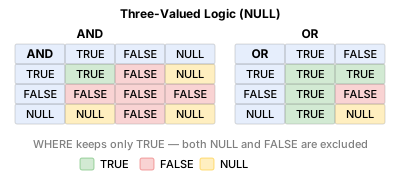
Arithmetic operations involving NULL produce NULL as the result.
-- NULL propagates through operations
SELECT
    1 + NULL,       -- NULL
    NULL * 100,     -- NULL
    'hello' || NULL -- NULL (string concatenation too)
Use COALESCE to prevent NULL propagation.
Summary
| Syntax | Description | Example |
|---|---|---|
IS NULL |
Check if a value is NULL | WHERE birth_date IS NULL |
IS NOT NULL |
Check if a value is not NULL | WHERE gender IS NOT NULL |
COALESCE(a, b, ...) |
Return the first non-NULL value | COALESCE(gender, 'Not provided') |
NULLIF(a, b) |
Return NULL if a = b (prevents division by zero) | price / NULLIF(stock_qty, 0) |
| Aggregates and NULL | SUM, AVG, COUNT(column), etc. ignore NULL | AVG calculates excluding NULL rows |
| NULL propagation | NULL + number = NULL | 1 + NULL -> NULL |
Lesson Review Problems
These are simple problems to immediately check the concepts learned in this lesson. For comprehensive practice combining multiple concepts, see the Practice Problems section.
Practice Problems
Problem 1
From the staff table, retrieve the name, department, and role of employees whose manager_id is NULL (top-level managers).
| name | department | role |
|---|---|---|
| Michael Thomas | Management | admin |
Problem 2
From the customers table, retrieve the name and email of customers whose phone is NULL. If email is also NULL, replace it with 'No contact info'.
Problem 3
Using NULLIF, safely calculate the price-to-stock ratio for products in the products table where stock_qty might be 0. Return name, price, stock_qty, and price / NULLIF(stock_qty, 0) with the alias price_per_unit. Limit the result to 5 rows.
Answer
SELECT
    name,
    price,
    stock_qty,
    price / NULLIF(stock_qty, 0) AS price_per_unit
FROM products
LIMIT 5;
Result (example):
| name | price | stock_qty | price_per_unit |
|---|---|---|---|
| Razer Blade 18 Black | 2987500.0 | 107 | 27920.560747663552 |
| MSI GeForce RTX 4070 Ti Super GAMING X | 1744000.0 | 499 | 3494.9899799599198 |
| Samsung DDR4 32GB PC4-25600 | 43500.0 | 359 | 121.16991643454038 |
| Dell U2724D | 894100.0 | 337 | 2653.1157270029676 |
| G.SKILL Trident Z5 DDR5 64GB 6000MHz White | 167000.0 | 59 | 2830.508474576271 |
| ... | ... | ... | ... |
Problem 4
From the customers table, retrieve the name, email, and created_at of customers whose last_login_at is NULL. Replace NULL email with 'None' and NULL created_at with 'Unknown'. Limit the result to 10 rows.
Answer
SELECT
    name,
    COALESCE(email, 'None')        AS email,
    COALESCE(created_at, 'Unknown') AS created_at
FROM customers
WHERE last_login_at IS NULL
LIMIT 10;
Result (example):
| name | created_at | |
|---|---|---|
| Sara Harvey | user25@testmail.kr | 2016-02-03 04:18:52 |
| Terry Miller DVM | user43@testmail.kr | 2016-02-23 17:09:54 |
| Russell Castillo | user66@testmail.kr | 2016-05-07 02:57:58 |
| Tony Jones | user77@testmail.kr | 2016-04-29 00:44:20 |
| Amy Smith | user80@testmail.kr | 2016-08-13 13:52:58 |
| Tonya Torres | user101@testmail.kr | 2017-04-08 22:00:58 |
| Paula Allen | user107@testmail.kr | 2017-12-01 07:23:31 |
| Steven Bailey | user113@testmail.kr | 2017-07-09 04:23:22 |
| ... | ... | ... |
Problem 5
Retrieve all orders without an assigned staff member (staff_id IS NULL). Display order_number, status, and notes, replacing NULL notes with '—'.
Answer
SELECT
    order_number,
    status,
    COALESCE(notes, '—') AS notes
FROM orders
WHERE staff_id IS NULL
ORDER BY ordered_at DESC
LIMIT 20;
Result (example):
| order_number | status | notes |
|---|---|---|
| ORD-20251231-37555 | pending | — |
| ORD-20251231-37543 | pending | Please knock gently |
| ORD-20251231-37552 | pending | — |
| ORD-20251231-37548 | pending | — |
| ORD-20251231-37542 | pending | Deliver to the office front desk |
| ORD-20251231-37546 | pending | Leave with the doorman/concierge |
| ORD-20251231-37547 | pending | Handle with care — fragile |
| ORD-20251231-37556 | pending | — |
| ... | ... | ... |
Problem 6
Query the number of customers with confirmed gender and those with unspecified gender, by membership grade. Use COALESCE(gender, 'Unknown') as the grouping basis.
Answer
SELECT
    grade,
    COALESCE(gender, 'Unknown') AS gender_status,
    COUNT(*) AS customer_count
FROM customers
GROUP BY grade, COALESCE(gender, 'Unknown')
ORDER BY grade, gender_status;
Result (example):
| grade | gender_status | customer_count |
|---|---|---|
| BRONZE | F | 1302 |
| BRONZE | M | 2128 |
| BRONZE | Unknown | 429 |
| GOLD | F | 140 |
| GOLD | M | 343 |
| GOLD | Unknown | 41 |
| SILVER | F | 141 |
| SILVER | M | 293 |
| ... | ... | ... |
Problem 7
From the orders table, count the number of orders where cancelled_at is NULL (not cancelled) and where it is NOT NULL (cancelled). Use the aliases not_cancelled and cancelled.
Answer
SELECT
    COUNT(CASE WHEN cancelled_at IS NULL THEN 1 END)     AS not_cancelled,
    COUNT(CASE WHEN cancelled_at IS NOT NULL THEN 1 END) AS cancelled
FROM orders;
Result (example):
| not_cancelled | cancelled |
|---|---|
| 35698 | 1859 |
Problem 8
From the products table, find the number of products with NULL weight_grams and the total product count, then calculate the NULL percentage (1 decimal place). Use the aliases total_products, missing_weight, and pct_missing.
Answer
SELECT
    COUNT(*)                                AS total_products,
    COUNT(*) - COUNT(weight_grams)                AS missing_weight,
    ROUND(100.0 * (COUNT(*) - COUNT(weight_grams)) / COUNT(*), 1) AS pct_missing
FROM products;
Result (example):
| total_products | missing_weight | pct_missing |
|---|---|---|
| 280 | 12 | 4.3 |
Problem 9
From the reviews table, calculate the average rating for reviews where content is NULL and where it is NOT NULL. Display COUNT(*) and AVG(rating) together.
Answer
SELECT
    CASE WHEN content IS NULL THEN 'No Content' ELSE 'Has Content' END AS content_status,
    COUNT(*)        AS review_count,
    AVG(rating)     AS avg_rating
FROM reviews
GROUP BY CASE WHEN content IS NULL THEN 'No Content' ELSE 'Has Content' END;
Result (example):
| content_status | review_count | avg_rating |
|---|---|---|
| Has Content | 7708 | 3.9021795537104307 |
| No Content | 838 | 3.9307875894988067 |
Problem 10
Find the count of customers missing birth date, gender, and login history respectively, along with the total customer count.
Answer
SELECT
    COUNT(*)                                         AS total_customers,
    COUNT(*) - COUNT(birth_date)                    AS missing_birth_date,
    COUNT(*) - COUNT(gender)                        AS missing_gender,
    SUM(CASE WHEN last_login_at IS NULL THEN 1 ELSE 0 END) AS never_logged_in
FROM customers;
Result (example):
| total_customers | missing_birth_date | missing_gender | never_logged_in |
|---|---|---|---|
| 5230 | 738 | 529 | 281 |
Scoring Guide
| Score | Next Step |
|---|---|
| 9-10 | Move to Lesson 7: CASE Expressions |
| 7-8 | Review the explanations for incorrect answers, then proceed to the next lesson |
| 5 or fewer | Read this lesson again |
| 3 or fewer | Start over from Lesson 5: GROUP BY |
Problem Areas:
| Area | Problems |
|---|---|
| IS NULL | 1, 5 |
| COALESCE | 2, 4 |
| NULLIF | 3 |
| COALESCE + GROUP BY | 6 |
| Aggregates and NULL (CASE + COUNT) | 7, 8 |
| NULL group comparison (AVG + IS NULL) | 9 |
| NULL propagation (multi-column missing aggregation) | 10 |