Lesson 21: SELF JOIN and CROSS JOIN
In Lessons 8-9, we connected different tables using INNER JOIN and LEFT JOIN. Now we will learn two special JOINs. SELF JOIN connects a table to itself (manager-employee relationships), and CROSS JOIN creates all combinations (dates x categories).
Already familiar?
If you are comfortable with SELF JOIN and CROSS JOIN, skip ahead to Lesson 22: Views.
A Self-JOIN joins a table to itself. The manager_id in the staff table can represent an organization chart.
Common real-world scenarios for SELF JOIN and CROSS JOIN:
- Hierarchical relationships: Manager-employee, category parent-child (SELF JOIN)
- Pair comparison: Analyzing product/customer pairs under same conditions (SELF JOIN + id < id)
- Complete matrix: Month x category, grade x payment method reports with no gaps (CROSS JOIN)
- Ratio calculation: Attach grand total to every row via CROSS JOIN for % calculation
SELF JOIN — Joining a Table to Itself
SELF JOIN is not special syntax. Simply JOIN the same table with different aliases.
Querying Category Hierarchy
The categories table references itself via parent_id. A SELF JOIN can expand the parent-child relationship.
-- 카테고리의 부모-자식 관계 조회
SELECT
    child.id,
    child.name       AS category,
    child.depth,
    parent.name      AS parent_category
FROM categories AS child
LEFT JOIN categories AS parent ON child.parent_id = parent.id
ORDER BY child.depth, child.sort_order;
Result (example):
| id | category | depth | parent_category |
|---|---|---|---|
| 1 | Desktop PC | 0 | (NULL) |
| 5 | Laptop | 0 | (NULL) |
| 10 | Monitor | 0 | (NULL) |
| 14 | CPU | 0 | (NULL) |
| 17 | Motherboard | 0 | (NULL) |
| 20 | Memory (RAM) | 0 | (NULL) |
| 23 | Storage | 0 | (NULL) |
| 27 | Graphics Card | 0 | (NULL) |
| ... | ... | ... | ... |
Top-level categories (depth=0) have NULL parent_id, so parent_category is also NULL. LEFT JOIN is used to include these rows in the results.
Building Top-Sub Category Paths
A SELF JOIN can build the full path from parent (top category) to child (sub category).
Result (example):
| top_category | sub_category | full_path |
|---|---|---|
| 데스크톱 PC | 완제품 | 데스크톱 PC > 완제품 |
| 데스크톱 PC | 조립PC | 데스크톱 PC > 조립PC |
| 노트북 | 일반 노트북 | 노트북 > 일반 노트북 |
| 노트북 | 게이밍 노트북 | 노트북 > 게이밍 노트북 |
| ... |
Tip: SELF JOIN is concise when the hierarchy depth is fixed. For variable depth, use recursive CTEs from Lesson 19.
Comparing Products Within the Same Category
To compare prices between products in the same category, JOIN the products table to itself.
-- 같은 카테고리에서 가격 차이가 가장 큰 상품 쌍 찾기
SELECT
    p1.name AS product_a,
    p2.name AS product_b,
    p1.price AS price_a,
    p2.price AS price_b,
    ABS(p1.price - p2.price) AS price_diff
FROM products AS p1
INNER JOIN products AS p2
    ON p1.category_id = p2.category_id
   AND p1.id < p2.id  -- 중복 쌍 방지 (A-B만, B-A는 제외)
ORDER BY price_diff DESC
LIMIT 10;
The p1.id < p2.id condition is key. Without it, both (A, B) and (B, A) would appear, and (A, A) self-pairs would be included.
Employee Organization Chart (staff.manager_id)
The staff table's manager_id references id in the same table. You can query the employee-manager relationship.
SELECT
    s.name AS employee,
    s.department,
    s.role,
    m.name AS manager
FROM staff s
LEFT JOIN staff m ON s.manager_id = m.id
ORDER BY s.id;
Product Succession (products.successor_id)
Query discontinued products and their successor models.
SELECT
    old.name AS discontinued_product,
    old.discontinued_at,
    new.name AS successor_product,
    new.price AS new_price
FROM products old
JOIN products new ON old.successor_id = new.id
WHERE old.successor_id IS NOT NULL
ORDER BY old.discontinued_at;
Product Q&A Thread (product_qna.parent_id)
Display questions and answers on a single row.
SELECT
    q.id AS question_id,
    q.content AS question,
    a.content AS answer,
    a.created_at AS answered_at
FROM product_qna q
LEFT JOIN product_qna a ON a.parent_id = q.id
WHERE q.parent_id IS NULL  -- top-level questions only
ORDER BY q.created_at DESC
LIMIT 10;
CROSS JOIN — Generating All Combinations
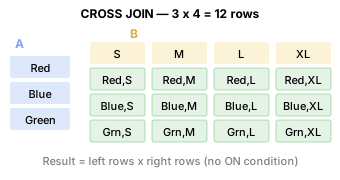
CROSS JOIN combines every row from the left table with every row from the right table. Result rows = left rows x right rows. There is no ON condition.
Month-Category Matrix
When a revenue report needs to show "months with no data," first create an empty frame with CROSS JOIN, then LEFT JOIN actual data.
-- 2024 12 months x top-level category matrix
WITH months AS (
    SELECT '2024-01' AS m UNION ALL SELECT '2024-02'
    UNION ALL SELECT '2024-03' UNION ALL SELECT '2024-04'
    UNION ALL SELECT '2024-05' UNION ALL SELECT '2024-06'
    UNION ALL SELECT '2024-07' UNION ALL SELECT '2024-08'
    UNION ALL SELECT '2024-09' UNION ALL SELECT '2024-10'
    UNION ALL SELECT '2024-11' UNION ALL SELECT '2024-12'
),
top_categories AS (
    SELECT id, name FROM categories WHERE depth = 0
),
monthly_sales AS (
    SELECT
        SUBSTR(o.ordered_at, 1, 7) AS year_month,
        COALESCE(parent.id, cat.id) AS category_id,
        ROUND(SUM(oi.quantity * oi.unit_price), 2) AS revenue
    FROM order_items AS oi
    INNER JOIN orders     AS o      ON oi.order_id   = o.id
    INNER JOIN products   AS p      ON oi.product_id = p.id
    INNER JOIN categories AS cat    ON p.category_id = cat.id
    LEFT  JOIN categories AS parent ON cat.parent_id = parent.id
    WHERE o.ordered_at LIKE '2024%'
      AND o.status NOT IN ('cancelled', 'returned', 'return_requested')
    GROUP BY SUBSTR(o.ordered_at, 1, 7), COALESCE(parent.id, cat.id)
)
SELECT
    m.m AS year_month,
    tc.name AS category,
    COALESCE(ms.revenue, 0) AS revenue
FROM months AS m
CROSS JOIN top_categories AS tc
LEFT JOIN monthly_sales AS ms
    ON m.m = ms.year_month AND tc.id = ms.category_id
ORDER BY m.m, tc.name;
WITH months AS (
    SELECT '2024-01' AS m UNION ALL SELECT '2024-02'
    UNION ALL SELECT '2024-03' UNION ALL SELECT '2024-04'
    UNION ALL SELECT '2024-05' UNION ALL SELECT '2024-06'
    UNION ALL SELECT '2024-07' UNION ALL SELECT '2024-08'
    UNION ALL SELECT '2024-09' UNION ALL SELECT '2024-10'
    UNION ALL SELECT '2024-11' UNION ALL SELECT '2024-12'
),
top_categories AS (
    SELECT id, name FROM categories WHERE depth = 0
),
monthly_sales AS (
    SELECT
        DATE_FORMAT(o.ordered_at, '%Y-%m') AS year_month,
        COALESCE(parent.id, cat.id) AS category_id,
        ROUND(SUM(oi.quantity * oi.unit_price), 2) AS revenue
    FROM order_items AS oi
    INNER JOIN orders     AS o      ON oi.order_id   = o.id
    INNER JOIN products   AS p      ON oi.product_id = p.id
    INNER JOIN categories AS cat    ON p.category_id = cat.id
    LEFT  JOIN categories AS parent ON cat.parent_id = parent.id
    WHERE o.ordered_at >= '2024-01-01'
      AND o.ordered_at <  '2025-01-01'
      AND o.status NOT IN ('cancelled', 'returned', 'return_requested')
    GROUP BY DATE_FORMAT(o.ordered_at, '%Y-%m'), COALESCE(parent.id, cat.id)
)
SELECT
    m.m AS year_month,
    tc.name AS category,
    COALESCE(ms.revenue, 0) AS revenue
FROM months AS m
CROSS JOIN top_categories AS tc
LEFT JOIN monthly_sales AS ms
    ON m.m = ms.year_month AND tc.id = ms.category_id
ORDER BY m.m, tc.name;
WITH months AS (
    SELECT '2024-01' AS m UNION ALL SELECT '2024-02'
    UNION ALL SELECT '2024-03' UNION ALL SELECT '2024-04'
    UNION ALL SELECT '2024-05' UNION ALL SELECT '2024-06'
    UNION ALL SELECT '2024-07' UNION ALL SELECT '2024-08'
    UNION ALL SELECT '2024-09' UNION ALL SELECT '2024-10'
    UNION ALL SELECT '2024-11' UNION ALL SELECT '2024-12'
),
top_categories AS (
    SELECT id, name FROM categories WHERE depth = 0
),
monthly_sales AS (
    SELECT
        TO_CHAR(o.ordered_at, 'YYYY-MM') AS year_month,
        COALESCE(parent.id, cat.id) AS category_id,
        ROUND(SUM(oi.quantity * oi.unit_price), 2) AS revenue
    FROM order_items AS oi
    INNER JOIN orders     AS o      ON oi.order_id   = o.id
    INNER JOIN products   AS p      ON oi.product_id = p.id
    INNER JOIN categories AS cat    ON p.category_id = cat.id
    LEFT  JOIN categories AS parent ON cat.parent_id = parent.id
    WHERE o.ordered_at >= '2024-01-01'
      AND o.ordered_at <  '2025-01-01'
      AND o.status NOT IN ('cancelled', 'returned', 'return_requested')
    GROUP BY TO_CHAR(o.ordered_at, 'YYYY-MM'), COALESCE(parent.id, cat.id)
)
SELECT
    m.m AS year_month,
    tc.name AS category,
    COALESCE(ms.revenue, 0) AS revenue
FROM months AS m
CROSS JOIN top_categories AS tc
LEFT JOIN monthly_sales AS ms
    ON m.m = ms.year_month AND tc.id = ms.category_id
ORDER BY m.m, tc.name;
After creating a complete matrix of 12 x N rows with CROSS JOIN, LEFT JOIN attaches actual revenue. Cells with no revenue become 0 via COALESCE.
Calculating Ratios Against Total Revenue
Another CROSS JOIN use case: attach the grand total to every row for ratio calculation.
-- 각 결제 수단이 전체 매출에서 차지하는 비율
SELECT
    p.method,
    COUNT(*)              AS tx_count,
    ROUND(SUM(p.amount), 2) AS total_amount,
    ROUND(100.0 * SUM(p.amount) / gt.grand_total, 1) AS pct
FROM payments AS p
CROSS JOIN (
    SELECT SUM(amount) AS grand_total
    FROM payments
    WHERE status = 'completed'
) AS gt
WHERE p.status = 'completed'
GROUP BY p.method, gt.grand_total
ORDER BY total_amount DESC;
Warning: CROSS JOIN is powerful, but CROSS JOINing large tables causes row explosion. Only use it when one or both sides are small result sets.
Finding Days with No Orders (calendar CROSS JOIN)
Find days with no orders using the calendar table with CROSS JOIN + LEFT JOIN.
SELECT
    c.date_key,
    c.day_name,
    c.is_weekend,
    c.is_holiday,
    c.holiday_name
FROM calendar c
LEFT JOIN orders o ON DATE(o.ordered_at) = c.date_key
WHERE o.id IS NULL
  AND c.year >= 2024
ORDER BY c.date_key;
Summary
| JOIN Type | Description | Common Use Cases |
|---|---|---|
| SELF JOIN | JOIN the same table with different aliases | Manager-employee, category parent-child, pair comparison under same conditions |
| CROSS JOIN | All combinations of both sides (M x N) | Date x category matrix, ratio against total |
SELF JOIN + id < id |
Deduplicate pairs (only A-B, not B-A) | Same department employee pairs, same grade customer pairs |
| CROSS JOIN + LEFT JOIN | Complete report including empty cells | Monthly x category revenue (empty cells = 0) |
Lesson Review Problems
These are simple problems to immediately test the concepts learned in this lesson. For comprehensive practice combining multiple concepts, see the Practice Problems section.
Practice Problems
Problem 1: Employee-Manager Organization Chart
SELF JOIN the staff table to query each employee's name, department, role, and manager name. Include employees with no manager (e.g., CEO).
Answer
SELECT
    s.name       AS employee,
    s.department,
    s.role,
    m.name       AS manager
FROM staff AS s
LEFT JOIN staff AS m ON s.manager_id = m.id
ORDER BY s.department, s.name;
Result (example):
| employee | department | role | manager |
|---|---|---|---|
| Jonathan Smith | Management | admin | Michael Thomas |
| Michael Mcguire | Management | admin | Michael Thomas |
| Michael Thomas | Management | admin | (NULL) |
| Nicole Hamilton | Marketing | manager | Jonathan Smith |
| Jaime Phelps | Sales | manager | Michael Thomas |
| ... | ... | ... | ... |
Problem 2: Same Department Employee Pairs
Find employee pairs in the same department. Remove duplicate pairs (id < id) and display the department name and both employee names.
Answer
SELECT
    s1.department,
    s1.name AS staff_a,
    s2.name AS staff_b
FROM staff AS s1
INNER JOIN staff AS s2
    ON s1.department = s2.department
   AND s1.id < s2.id
ORDER BY s1.department, s1.name;
Result (example):
| department | staff_a | staff_b |
|---|---|---|
| Management | Michael Mcguire | Jonathan Smith |
| Management | Michael Thomas | Jonathan Smith |
| Management | Michael Thomas | Michael Mcguire |
Problem 3: Same Grade Customer Pairs
Find customer pairs with the same grade, removing duplicate pairs (id < id). Display grade, customer A name, customer B name, and show only the top 10.
Answer
SELECT
    c1.grade,
    c1.name AS customer_a,
    c2.name AS customer_b
FROM customers AS c1
INNER JOIN customers AS c2
    ON c1.grade = c2.grade
   AND c1.id < c2.id
WHERE c1.is_active = 1
  AND c2.is_active = 1
ORDER BY c1.grade, c1.name
LIMIT 10;
Result (example):
| grade | customer_a | customer_b |
|---|---|---|
| BRONZE | Aaron Carr | Aaron Cooper |
| BRONZE | Aaron Carr | Aaron Cortez |
| BRONZE | Aaron Carr | Aaron Meyer |
| BRONZE | Aaron Carr | Aaron Price |
| BRONZE | Aaron Carr | Aaron Wells |
| BRONZE | Aaron Carr | Abigail Hopkins |
| BRONZE | Aaron Carr | Abigail Marquez |
| BRONZE | Aaron Carr | Adam Gonzalez |
| ... | ... | ... |
Problem 4: Same Supplier Product Pairs
Find product pairs supplied by the same supplier and display them with price difference. Remove duplicate pairs.
Answer
SELECT
    s.company_name AS supplier,
    p1.name AS product_a,
    p2.name AS product_b,
    p1.price AS price_a,
    p2.price AS price_b,
    ABS(p1.price - p2.price) AS price_diff
FROM products AS p1
INNER JOIN products AS p2
    ON p1.supplier_id = p2.supplier_id
   AND p1.id < p2.id
INNER JOIN suppliers AS s ON p1.supplier_id = s.id
ORDER BY price_diff DESC
LIMIT 10;
Result (example):
| supplier | product_a | product_b | price_a | price_b | price_diff |
|---|---|---|---|---|---|
| Apple Corp. | Apple Magic Keyboard Silver | MacBook Air 15 M3 Silver | 149700.0 | 5481100.0 | 5331400.0 |
| ASUS Corp. | ASUS TUF Gaming RTX 5080 White | ASUS PCE-BE92BT | 4526600.0 | 47200.0 | 4479400.0 |
| ASUS Corp. | ASUS TUF Gaming RTX 5080 White | ASUS PCE-BE92BT Black | 4526600.0 | 74900.0 | 4451700.0 |
| ASUS Corp. | ASUS PCE-BE92BT | ASUS Dual RTX 5070 Ti [Special Limited Edition] Low-noise design, energy efficiency rated, eco-friendly packaging | 47200.0 | 4496700.0 | 4449500.0 |
| ASUS Corp. | ASUS PCE-BE92BT Black | ASUS Dual RTX 5070 Ti [Special Limited Edition] Low-noise design, energy efficiency rated, eco-friendly packaging | 74900.0 | 4496700.0 | 4421800.0 |
| ASUS Corp. | ASUS TUF Gaming RTX 5080 White | ASUS PCE-BE92BT | 4526600.0 | 111500.0 | 4415100.0 |
| ASUS Corp. | ASUS TUF Gaming RTX 5080 White | ASUS XG-C100C Black | 4526600.0 | 117900.0 | 4408700.0 |
| ASUS Corp. | ASUS TUF Gaming RTX 5080 White | ASUS RT-AX86U Pro Silver | 4526600.0 | 132600.0 | 4394000.0 |
| ... | ... | ... | ... | ... | ... |
Problem 5: Customers with Multiple Shipping Addresses
Find cases where the same customer has ordered to different addresses. (SELF JOIN the customer_addresses table)
Answer
SELECT
    c.name,
    a1.address1 AS address_1,
    a2.address1 AS address_2
FROM customer_addresses AS a1
INNER JOIN customer_addresses AS a2
    ON a1.customer_id = a2.customer_id
   AND a1.id < a2.id
   AND a1.address1 <> a2.address1
INNER JOIN customers AS c ON a1.customer_id = c.id
GROUP BY c.id, c.name, a1.address1, a2.address1
ORDER BY c.name
LIMIT 15;
Result (example):
| name | address_1 | address_2 |
|---|---|---|
| Aaron Green | 1512 Aaron Row | 70592 Cameron Divide Suite 159 |
| Aaron Harris | 3836 Young Avenue | 1958 Travis Ports |
| Aaron Medina | 43653 Garcia Freeway Apt. 431 | 851 Bowman Island Suite 053 |
| Aaron Medina | 43653 Garcia Freeway Apt. 431 | 9282 Allen Corner |
| Aaron Medina | 851 Bowman Island Suite 053 | 9282 Allen Corner |
| Aaron Moore | 8769 Jessica Parkway | USNS Barnes |
| Aaron Price | 605 Owen Mountain | 900 Julia Shoal Suite 899 |
| Aaron Ryan | 01710 Dunlap Fort | 548 Gonzalez Springs |
| ... | ... | ... |
Problem 6: Ratio Calculation with CROSS JOIN
Calculate the percentage (%) each customer grade represents of total active customers. Use CROSS JOIN to attach the total count for calculation. Round to one decimal place.
Answer
SELECT
    grade,
    COUNT(*)  AS grade_count,
    ROUND(100.0 * COUNT(*) / gt.total, 1) AS pct
FROM customers
CROSS JOIN (
    SELECT COUNT(*) AS total
    FROM customers
    WHERE is_active = 1
) AS gt
WHERE is_active = 1
GROUP BY grade, gt.total
ORDER BY pct DESC;
Result (example):
| grade | grade_count | pct |
|---|---|---|
| BRONZE | 2289 | 62.5 |
| GOLD | 524 | 14.3 |
| SILVER | 479 | 13.1 |
| VIP | 368 | 10.1 |
Problem 7: Quarter-Payment Method CROSS JOIN Report
Generate all combinations of 4 quarters (Q1-Q4) and payment methods (DISTINCT method) for 2024 using CROSS JOIN, and LEFT JOIN to get the total payment amount for each combination. Display 0 for cells with no payments.
Answer
WITH quarters AS (
    SELECT 'Q1' AS q, '2024-01' AS start_m, '2024-03' AS end_m
    UNION ALL SELECT 'Q2', '2024-04', '2024-06'
    UNION ALL SELECT 'Q3', '2024-07', '2024-09'
    UNION ALL SELECT 'Q4', '2024-10', '2024-12'
),
methods AS (
    SELECT DISTINCT method FROM payments
),
quarterly_payments AS (
    SELECT
        CASE
            WHEN SUBSTR(paid_at, 6, 2) IN ('01','02','03') THEN 'Q1'
            WHEN SUBSTR(paid_at, 6, 2) IN ('04','05','06') THEN 'Q2'
            WHEN SUBSTR(paid_at, 6, 2) IN ('07','08','09') THEN 'Q3'
            ELSE 'Q4'
        END AS q,
        method,
        SUM(amount) AS total_amount
    FROM payments
    WHERE status = 'completed'
      AND paid_at LIKE '2024%'
    GROUP BY q, method
)
SELECT
    qr.q,
    m.method,
    COALESCE(ROUND(qp.total_amount, 2), 0) AS total_amount
FROM quarters AS qr
CROSS JOIN methods AS m
LEFT JOIN quarterly_payments AS qp
    ON qr.q = qp.q AND m.method = qp.method
ORDER BY qr.q, m.method;
Result (example):
| q | method | total_amount |
|---|---|---|
| Q1 | bank_transfer | 98541709.0 |
| Q1 | card | 526711551.0 |
| Q1 | kakao_pay | 244005919.0 |
| Q1 | naver_pay | 196322827.0 |
| Q1 | point | 89533449.0 |
| Q1 | virtual_account | 56765116.0 |
| Q2 | bank_transfer | 107063738.0 |
| Q2 | card | 629458185.0 |
| ... | ... | ... |
=== "MySQL"
    ```sql
    WITH quarters AS (
        SELECT 'Q1' AS q, 1 AS start_m, 3 AS end_m
        UNION ALL SELECT 'Q2', 4, 6
        UNION ALL SELECT 'Q3', 7, 9
        UNION ALL SELECT 'Q4', 10, 12
    ),
    methods AS (
        SELECT DISTINCT method FROM payments
    ),
    quarterly_payments AS (
        SELECT
            CASE
                WHEN MONTH(paid_at) BETWEEN 1 AND 3 THEN 'Q1'
                WHEN MONTH(paid_at) BETWEEN 4 AND 6 THEN 'Q2'
                WHEN MONTH(paid_at) BETWEEN 7 AND 9 THEN 'Q3'
                ELSE 'Q4'
            END AS q,
            method,
            SUM(amount) AS total_amount
        FROM payments
        WHERE status = 'completed'
          AND paid_at >= '2024-01-01'
          AND paid_at <  '2025-01-01'
        GROUP BY q, method
    )
    SELECT
        qr.q,
        m.method,
        COALESCE(ROUND(qp.total_amount, 2), 0) AS total_amount
    FROM quarters AS qr
    CROSS JOIN methods AS m
    LEFT JOIN quarterly_payments AS qp
        ON qr.q = qp.q AND m.method = qp.method
    ORDER BY qr.q, m.method;
    ```

=== "PostgreSQL"
    ```sql
    WITH quarters AS (
        SELECT 'Q1' AS q, 1 AS start_m, 3 AS end_m
        UNION ALL SELECT 'Q2', 4, 6
        UNION ALL SELECT 'Q3', 7, 9
        UNION ALL SELECT 'Q4', 10, 12
    ),
    methods AS (
        SELECT DISTINCT method FROM payments
    ),
    quarterly_payments AS (
        SELECT
            CASE
                WHEN EXTRACT(MONTH FROM paid_at) BETWEEN 1 AND 3 THEN 'Q1'
                WHEN EXTRACT(MONTH FROM paid_at) BETWEEN 4 AND 6 THEN 'Q2'
                WHEN EXTRACT(MONTH FROM paid_at) BETWEEN 7 AND 9 THEN 'Q3'
                ELSE 'Q4'
            END AS q,
            method,
            SUM(amount) AS total_amount
        FROM payments
        WHERE status = 'completed'
          AND paid_at >= '2024-01-01'
          AND paid_at <  '2025-01-01'
        GROUP BY q, method
    )
    SELECT
        qr.q,
        m.method,
        COALESCE(ROUND(qp.total_amount, 2), 0) AS total_amount
    FROM quarters AS qr
    CROSS JOIN methods AS m
    LEFT JOIN quarterly_payments AS qp
        ON qr.q = qp.q AND m.method = qp.method
    ORDER BY qr.q, m.method;
    ```
Problem 8: Month-Supplier CROSS JOIN Report
For each combination of month and supplier in 2024, show the inbound quantity for that month. Display 0 for cells with no inbound.
Answer
WITH months AS (
    SELECT '2024-01' AS m UNION ALL SELECT '2024-02'
    UNION ALL SELECT '2024-03' UNION ALL SELECT '2024-04'
    UNION ALL SELECT '2024-05' UNION ALL SELECT '2024-06'
    UNION ALL SELECT '2024-07' UNION ALL SELECT '2024-08'
    UNION ALL SELECT '2024-09' UNION ALL SELECT '2024-10'
    UNION ALL SELECT '2024-11' UNION ALL SELECT '2024-12'
),
supplier_inbound AS (
    SELECT
        SUBSTR(it.created_at, 1, 7) AS year_month,
        p.supplier_id,
        SUM(it.quantity) AS inbound_qty
    FROM inventory_transactions AS it
    INNER JOIN products AS p ON it.product_id = p.id
    WHERE it.type = 'inbound' AND it.created_at LIKE '2024%'
    GROUP BY SUBSTR(it.created_at, 1, 7), p.supplier_id
)
SELECT
    m.m AS year_month,
    s.company_name AS supplier,
    COALESCE(si.inbound_qty, 0) AS inbound_qty
FROM months AS m
CROSS JOIN suppliers AS s
LEFT JOIN supplier_inbound AS si
    ON m.m = si.year_month AND s.id = si.supplier_id
ORDER BY m.m, s.company_name
LIMIT 30;
Result (example):
| year_month | supplier | inbound_qty |
|---|---|---|
| 2024-01 | ABKO | 0 |
| 2024-01 | ADATA Corp. | 0 |
| 2024-01 | AMD Corp. | 0 |
| 2024-01 | APC Corp. | 0 |
| 2024-01 | ASRock Corp. | 0 |
| 2024-01 | ASUS Corp. | 160 |
| 2024-01 | Absolute Technology | 0 |
| 2024-01 | Acer Corp. | 0 |
| ... | ... | ... |
=== "MySQL"
    ```sql
    WITH months AS (
        SELECT '2024-01' AS m UNION ALL SELECT '2024-02'
        UNION ALL SELECT '2024-03' UNION ALL SELECT '2024-04'
        UNION ALL SELECT '2024-05' UNION ALL SELECT '2024-06'
        UNION ALL SELECT '2024-07' UNION ALL SELECT '2024-08'
        UNION ALL SELECT '2024-09' UNION ALL SELECT '2024-10'
        UNION ALL SELECT '2024-11' UNION ALL SELECT '2024-12'
    ),
    supplier_inbound AS (
        SELECT
            DATE_FORMAT(it.created_at, '%Y-%m') AS year_month,
            p.supplier_id,
            SUM(it.quantity) AS inbound_qty
        FROM inventory_transactions AS it
        INNER JOIN products AS p ON it.product_id = p.id
        WHERE it.type = 'inbound'
          AND it.created_at >= '2024-01-01'
          AND it.created_at <  '2025-01-01'
        GROUP BY DATE_FORMAT(it.created_at, '%Y-%m'), p.supplier_id
    )
    SELECT
        m.m AS year_month,
        s.company_name AS supplier,
        COALESCE(si.inbound_qty, 0) AS inbound_qty
    FROM months AS m
    CROSS JOIN suppliers AS s
    LEFT JOIN supplier_inbound AS si
        ON m.m = si.year_month AND s.id = si.supplier_id
    ORDER BY m.m, s.company_name
    LIMIT 30;
    ```

=== "PostgreSQL"
    ```sql
    WITH months AS (
        SELECT '2024-01' AS m UNION ALL SELECT '2024-02'
        UNION ALL SELECT '2024-03' UNION ALL SELECT '2024-04'
        UNION ALL SELECT '2024-05' UNION ALL SELECT '2024-06'
        UNION ALL SELECT '2024-07' UNION ALL SELECT '2024-08'
        UNION ALL SELECT '2024-09' UNION ALL SELECT '2024-10'
        UNION ALL SELECT '2024-11' UNION ALL SELECT '2024-12'
    ),
    supplier_inbound AS (
        SELECT
            TO_CHAR(it.created_at, 'YYYY-MM') AS year_month,
            p.supplier_id,
            SUM(it.quantity) AS inbound_qty
        FROM inventory_transactions AS it
        INNER JOIN products AS p ON it.product_id = p.id
        WHERE it.type = 'inbound'
          AND it.created_at >= '2024-01-01'
          AND it.created_at <  '2025-01-01'
        GROUP BY TO_CHAR(it.created_at, 'YYYY-MM'), p.supplier_id
    )
    SELECT
        m.m AS year_month,
        s.company_name AS supplier,
        COALESCE(si.inbound_qty, 0) AS inbound_qty
    FROM months AS m
    CROSS JOIN suppliers AS s
    LEFT JOIN supplier_inbound AS si
        ON m.m = si.year_month AND s.id = si.supplier_id
    ORDER BY m.m, s.company_name
    LIMIT 30;
    ```
Problem 9: Grade-Category CROSS JOIN
Generate all combinations of customer grades (DISTINCT grade) and top-level categories (depth = 0) using CROSS JOIN, and LEFT JOIN to get the order count for each combination. Display 0 for combinations with no orders.
Answer
WITH grades AS (
    SELECT DISTINCT grade FROM customers WHERE grade IS NOT NULL
),
top_cats AS (
    SELECT id, name FROM categories WHERE depth = 0
),
grade_cat_orders AS (
    SELECT
        c.grade,
        COALESCE(pcat.id, cat.id) AS category_id,
        COUNT(DISTINCT o.id) AS order_count
    FROM orders AS o
    INNER JOIN customers AS c ON o.customer_id = c.id
    INNER JOIN order_items AS oi ON o.id = oi.order_id
    INNER JOIN products AS p ON oi.product_id = p.id
    INNER JOIN categories AS cat ON p.category_id = cat.id
    LEFT  JOIN categories AS pcat ON cat.parent_id = pcat.id
    GROUP BY c.grade, COALESCE(pcat.id, cat.id)
)
SELECT
    g.grade,
    tc.name AS category,
    COALESCE(gco.order_count, 0) AS order_count
FROM grades AS g
CROSS JOIN top_cats AS tc
LEFT JOIN grade_cat_orders AS gco
    ON g.grade = gco.grade AND tc.id = gco.category_id
ORDER BY g.grade, tc.name;
Result (example):
| grade | category | order_count |
|---|---|---|
| BRONZE | CPU | 805 |
| BRONZE | Case | 1220 |
| BRONZE | Cooling | 1104 |
| BRONZE | Desktop PC | 176 |
| BRONZE | Graphics Card | 798 |
| BRONZE | Keyboard | 2569 |
| BRONZE | Laptop | 815 |
| BRONZE | Memory (RAM) | 1454 |
| ... | ... | ... |
Problem 10: Category Parent-Child Relationship
SELF JOIN the categories table to query parent category name (parent_name) and child category name (child_name). Display '(최상위)' as parent_name for top-level categories with no parent.
Answer
SELECT
    COALESCE(parent.name, '(최상위)') AS parent_name,
    child.name                       AS child_name,
    child.depth
FROM categories AS child
LEFT JOIN categories AS parent ON child.parent_id = parent.id
ORDER BY parent.name, child.name;
Result (example):
| parent_name | child_name | depth |
|---|---|---|
| (최상위) | CPU | 0 |
| (최상위) | Case | 0 |
| (최상위) | Cooling | 0 |
| (최상위) | Desktop PC | 0 |
| (최상위) | Graphics Card | 0 |
| (최상위) | Keyboard | 0 |
| (최상위) | Laptop | 0 |
| (최상위) | Memory (RAM) | 0 |
| ... | ... | ... |
Scoring Guide
| Score | Next Step |
|---|---|
| 9-10 | Move to Lesson 22: Views |
| 7-8 | Review the explanations for incorrect answers, then proceed |
| Half or less | Re-read this lesson |
| 3 or fewer | Start again from Lesson 20: EXISTS |
Problem Areas:
| Area | Problems |
|---|---|
| SELF JOIN hierarchy/org chart | 1, 10 |
| SELF JOIN deduplicate pairs (id < id) | 2, 3, 4 |
| SELF JOIN address comparison | 5 |
| CROSS JOIN + ratio calculation | 6 |
| CROSS JOIN + CTE + LEFT JOIN matrix | 7, 8, 9 |
Next: Lesson 22: Views