Lesson 8: INNER JOIN
So far, we've only queried data from a single table. But in practice, you often need to combine data from multiple tables, like finding 'the name of the customer who placed an order'. In this lesson, you'll learn how to connect tables using INNER JOIN.
Already familiar?
If you're comfortable with INNER JOIN, ON conditions, and multi-table JOINs, skip ahead to Lesson 9: LEFT JOIN.
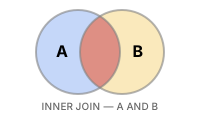
JOIN combines rows from two or more tables based on related columns. INNER JOIN returns only the rows that match in both tables -- unmatched rows are excluded from the result.
INNER JOIN returns only rows that match in both tables. Park (ID:3) has no orders, so they are excluded from the result.
Joining Two Tables
The syntax is FROM table_a INNER JOIN table_b ON table_a.key = table_b.key. The ON clause specifies the matching condition.
-- Query orders with customer names
SELECT
    o.order_number,
    c.name        AS customer_name,
    o.status,
    o.total_amount
FROM orders AS o
INNER JOIN customers AS c ON o.customer_id = c.id
ORDER BY o.ordered_at DESC
LIMIT 5;
Result:
| order_number | customer_name | status | total_amount |
|---|---|---|---|
| ORD-20251231-37555 | Angel Jones | pending | 74800.0 |
| ORD-20251231-37543 | Carla Watson | pending | 134100.0 |
| ORD-20251231-37552 | Martin Hanson | pending | 254300.0 |
| ORD-20251231-37548 | Lucas Johnson | pending | 187700.0 |
| ORD-20251231-37542 | Adam Moore | pending | 155700.0 |
| ... | ... | ... | ... |
Table aliases (
o,c) make queries shorter andONconditions easier to read. While not required, they are strongly recommended when joining multiple tables.
Why INNER JOIN Excludes Unmatched Rows
Customers who have never placed an order do not appear in the result -- because there is no matching row in orders. Conversely, thanks to foreign key constraints, every order must have a customer, so all orders are matched.
-- Check: Are there any orders without a customer?
SELECT COUNT(*) AS orders_without_customer
FROM orders o
LEFT JOIN customers c ON o.customer_id = c.id
WHERE c.id IS NULL;
Joining Three or More Tables
Chain additional JOIN clauses. Each one connects to the already-combined tables.
-- Include product name and category name in order items
SELECT
    oi.id           AS item_id,
    o.order_number,
    p.name          AS product_name,
    cat.name        AS category,
    oi.quantity,
    oi.unit_price
FROM order_items AS oi
INNER JOIN orders     AS o   ON oi.order_id   = o.id
INNER JOIN products   AS p   ON oi.product_id = p.id
INNER JOIN categories AS cat ON p.category_id = cat.id
ORDER BY o.ordered_at DESC
LIMIT 6;
Result:
| item_id | order_number | product_name | category | quantity | unit_price |
|---|---|---|---|---|---|
| 91101 | ORD-20251231-37555 | Norton AntiVirus Plus Silver | Security | 1 | 74800.0 |
| 91080 | ORD-20251231-37543 | Hancom Office 2024 Enterprise White | Office | 1 | 134100.0 |
| 91096 | ORD-20251231-37552 | Hancom Office 2024 Enterprise White | Office | 1 | 134100.0 |
| 91097 | ORD-20251231-37552 | NZXT Kraken 240 Silver | Liquid Cooling | 1 | 120200.0 |
| 91092 | ORD-20251231-37548 | Samsung 990 EVO Plus 1TB White | SSD | 1 | 187700.0 |
| 91079 | ORD-20251231-37542 | Logitech G PRO X2 Superstrike Black | Gaming | 1 | 155700.0 |
| ... | ... | ... | ... | ... | ... |
Aggregation After JOIN
Perform the join first, then aggregate. You can use columns from joined tables for grouping.
-- Total revenue by product category
SELECT
    cat.name        AS category,
    COUNT(DISTINCT o.id) AS order_count,
    SUM(oi.quantity)     AS units_sold,
    SUM(oi.quantity * oi.unit_price) AS gross_revenue
FROM order_items AS oi
INNER JOIN orders     AS o   ON oi.order_id   = o.id
INNER JOIN products   AS p   ON oi.product_id = p.id
INNER JOIN categories AS cat ON p.category_id = cat.id
WHERE o.status IN ('delivered', 'confirmed')
GROUP BY cat.name
ORDER BY gross_revenue DESC
LIMIT 8;
Result:
| category | order_count | units_sold | gross_revenue |
|---|---|---|---|
| Gaming Laptop | 1534 | 1586 | 4671979900.0 |
| AMD | 3309 | 3867 | 3007936300.0 |
| NVIDIA | 1529 | 1577 | 2672535800.0 |
| Gaming Monitor | 2199 | 2317 | 2636507300.0 |
| General Laptop | 1288 | 1303 | 2315576700.0 |
| 2-in-1 | 1179 | 1236 | 1844966800.0 |
| Intel Socket | 2943 | 3275 | 1495665600.0 |
| AMD Socket | 2862 | 3172 | 1458653400.0 |
| ... | ... | ... | ... |
Filtering Joined Tables
You can apply WHERE conditions to any table participating in the join.
-- Orders over 1,000,000 from VIP customers in 2024
SELECT
    c.name          AS customer_name,
    o.order_number,
    o.total_amount,
    o.ordered_at
FROM orders AS o
INNER JOIN customers AS c ON o.customer_id = c.id
WHERE c.grade = 'VIP'
  AND o.total_amount > 1000
  AND o.ordered_at LIKE '2024%'
ORDER BY o.total_amount DESC;
Summary
| Concept | Description | Example |
|---|---|---|
| INNER JOIN | Returns only matching rows from both tables | FROM orders INNER JOIN customers ON ... |
| ON clause | Specifies the join condition (typically FK = PK) | ON o.customer_id = c.id |
| Table alias | Assigns a short name to a table | orders AS o, customers AS c |
| Multi-table JOIN | Chain multiple JOINs to join 3+ tables | INNER JOIN products AS p ON ... |
| JOIN + aggregation | Aggregate with GROUP BY after joining | SUM(oi.quantity * oi.unit_price) |
| JOIN + WHERE | Apply filters to any joined table | WHERE c.grade = 'VIP' |
Lesson Review Problems
These are simple problems to immediately test the concepts from this lesson. For comprehensive practice combining multiple concepts, see the Practice Problems section.
Practice Problems
Problem 1
Query each review with the customer's name and product's name. Return review_id, customer_name, product_name, rating, created_at, sorted by rating descending then created_at descending, limited to 10 rows.
Answer
SELECT
    r.id          AS review_id,
    c.name        AS customer_name,
    p.name        AS product_name,
    r.rating,
    r.created_at
FROM reviews AS r
INNER JOIN customers AS c ON r.customer_id = c.id
INNER JOIN products  AS p ON r.product_id  = p.id
ORDER BY r.rating DESC, r.created_at DESC
LIMIT 10;
Result (example):
| review_id | customer_name | product_name | rating | created_at |
|---|---|---|---|---|
| 8535 | Jonathan Landry | Norton AntiVirus Plus Silver | 5 | 2026-01-13 12:09:18 |
| 8530 | Christine Maxwell | Netgear GS308 Silver | 5 | 2026-01-11 21:02:15 |
| 8541 | Jill Dalton | Arctic Liquid Freezer III Pro 420 A-RGB Silver | 5 | 2026-01-07 20:55:20 |
| 8517 | Stanley Long | ASUS Dual RTX 5070 Ti Silver | 5 | 2026-01-07 09:24:04 |
| 8536 | Mary Thomas | be quiet! Dark Power 13 1000W | 5 | 2026-01-06 21:29:23 |
| 8502 | Roy Castro | TP-Link TL-SG108 | 5 | 2026-01-06 15:27:04 |
| 8527 | Tiffany Graham | Microsoft Ergonomic Keyboard Silver | 5 | 2026-01-04 18:00:26 |
| 8488 | Samuel Jones | Kingston FURY Renegade DDR5 32GB 7200MHz Black | 5 | 2026-01-03 10:58:26 |
| ... | ... | ... | ... | ... |
Problem 2
Find the number of unique customers per payment method. Return method and unique_customers, sorted by unique_customers descending.
Answer
SELECT
    p.method,
    COUNT(DISTINCT o.customer_id) AS unique_customers
FROM payments AS p
INNER JOIN orders AS o ON p.order_id = o.id
WHERE p.status = 'completed'
GROUP BY p.method
ORDER BY unique_customers DESC;
Result (example):
| method | unique_customers |
|---|---|
| card | 2316 |
| kakao_pay | 1777 |
| naver_pay | 1598 |
| bank_transfer | 1332 |
| virtual_account | 923 |
| point | 892 |
| ... | ... |
Problem 3
Find the top 5 customers by total purchase amount (sum of total_amount excluding cancelled/returned orders). Return customer_name, grade, order_count, total_spent.
Answer
SELECT
    c.name   AS customer_name,
    c.grade,
    COUNT(o.id)         AS order_count,
    SUM(o.total_amount) AS total_spent
FROM orders AS o
INNER JOIN customers AS c ON o.customer_id = c.id
WHERE o.status NOT IN ('cancelled', 'returned', 'return_requested')
GROUP BY c.id, c.name, c.grade
ORDER BY total_spent DESC
LIMIT 5;
Result (example):
| customer_name | grade | order_count | total_spent |
|---|---|---|---|
| Allen Snyder | VIP | 303 | 403448758.0 |
| Jason Rivera | VIP | 342 | 366385931.0 |
| Brenda Garcia | VIP | 249 | 253180338.0 |
| Courtney Huff | VIP | 223 | 244604910.0 |
| Ronald Arellano | VIP | 219 | 235775349.0 |
| ... | ... | ... | ... |
Problem 4
Query order_number, customer_name, and status, filtering only orders with status 'shipped'. Sort by ordered_at descending and limit to 10 rows.
Answer
SELECT
    o.order_number,
    c.name   AS customer_name,
    o.status
FROM orders AS o
INNER JOIN customers AS c ON o.customer_id = c.id
WHERE o.status = 'shipped'
ORDER BY o.ordered_at DESC
LIMIT 10;
Result (example):
| order_number | customer_name | status |
|---|---|---|
| ORD-20251225-37416 | Rebecca Schneider | shipped |
| ORD-20251225-37402 | Jim Shannon | shipped |
| ORD-20251225-37410 | Drew Valencia | shipped |
| ORD-20251225-37403 | William Johnson | shipped |
| ORD-20251225-37411 | Daniel Mendez | shipped |
| ORD-20251225-37408 | Christine Johnson | shipped |
| ORD-20251225-37406 | Robert Mitchell | shipped |
| ORD-20251225-37407 | Jesse Villanueva | shipped |
| ... | ... | ... |
Problem 5
Join the shipping and orders tables to query order_number, carrier, tracking_number, and delivered_at for delivered orders. Sort by delivered_at descending and limit to 10 rows.
Answer
SELECT
    o.order_number,
    s.carrier,
    s.tracking_number,
    s.delivered_at
FROM shipping AS s
INNER JOIN orders AS o ON s.order_id = o.id
WHERE s.status = 'delivered'
ORDER BY s.delivered_at DESC
LIMIT 10;
Result (example):
| order_number | carrier | tracking_number | delivered_at |
|---|---|---|---|
| ORD-20251225-37399 | USPS | 376080377423 | 2026-01-01 23:36:22 |
| ORD-20251225-37404 | UPS | 652516112449 | 2026-01-01 22:02:51 |
| ORD-20251225-37414 | FedEx | 100421839710 | 2026-01-01 13:49:43 |
| ORD-20251225-37413 | OnTrac | 543173530520 | 2025-12-31 14:25:31 |
| ORD-20251225-37412 | OnTrac | 456720771228 | 2025-12-30 22:50:46 |
| ORD-20251224-37387 | OnTrac | 339128234015 | 2025-12-30 19:29:43 |
| ORD-20251225-37401 | UPS | 187550547718 | 2025-12-30 12:03:50 |
| ORD-20251224-37396 | UPS | 318330010876 | 2025-12-30 09:46:21 |
| ... | ... | ... | ... |
Problem 6
Query product name (products.name), supplier name (suppliers.company_name), quantity, and unit price from order_items. Join 3 tables and sort by unit price descending, limited to 10 rows.
Answer
SELECT
    p.name          AS product_name,
    sup.company_name AS supplier_name,
    oi.quantity,
    oi.unit_price
FROM order_items AS oi
INNER JOIN products  AS p   ON oi.product_id  = p.id
INNER JOIN suppliers AS sup ON p.supplier_id   = sup.id
ORDER BY oi.unit_price DESC
LIMIT 10;
Result (example):
| product_name | supplier_name | quantity | unit_price |
|---|---|---|---|
| MacBook Air 15 M3 Silver | Apple Corp. | 1 | 5481100.0 |
| MacBook Air 15 M3 Silver | Apple Corp. | 1 | 5481100.0 |
| MacBook Air 15 M3 Silver | Apple Corp. | 1 | 5481100.0 |
| MacBook Air 15 M3 Silver | Apple Corp. | 1 | 5481100.0 |
| MacBook Air 15 M3 Silver | Apple Corp. | 1 | 5481100.0 |
| MacBook Air 15 M3 Silver | Apple Corp. | 1 | 5481100.0 |
| MacBook Air 15 M3 Silver | Apple Corp. | 1 | 5481100.0 |
| MacBook Air 15 M3 Silver | Apple Corp. | 1 | 5481100.0 |
| ... | ... | ... | ... |
Problem 7
Find the total order count (order_count) and total quantity sold (total_qty) per supplier. Return company_name, order_count, total_qty, sorted by total_qty descending.
Answer
SELECT
    sup.company_name,
    COUNT(DISTINCT oi.order_id) AS order_count,
    SUM(oi.quantity)            AS total_qty
FROM order_items AS oi
INNER JOIN products  AS p   ON oi.product_id = p.id
INNER JOIN suppliers AS sup ON p.supplier_id  = sup.id
GROUP BY sup.id, sup.company_name
ORDER BY total_qty DESC;
Result (example):
| company_name | order_count | total_qty |
|---|---|---|
| Logitech Corp. | 7106 | 8580 |
| Samsung Official Distribution | 7169 | 8557 |
| Seorin Systech | 5143 | 6547 |
| SteelSeries Corp. | 5014 | 5772 |
| ASUS Corp. | 4945 | 5696 |
| be quiet! Corp. | 3516 | 4325 |
| MSI Corp. | 3531 | 4055 |
| ASRock Corp. | 3435 | 3900 |
| ... | ... | ... |
Problem 8
Find the order count (order_count) and total revenue (total_revenue) per assigned staff member. Exclude cancelled/returned orders. Return staff_name, department, order_count, total_revenue. Sort by total_revenue descending and return the top 10.
Answer
SELECT
    st.name        AS staff_name,
    st.department,
    COUNT(o.id)         AS order_count,
    SUM(o.total_amount) AS total_revenue
FROM orders AS o
INNER JOIN staff AS st ON o.staff_id = st.id
WHERE o.status NOT IN ('cancelled', 'returned', 'return_requested')
GROUP BY st.id, st.name, st.department
ORDER BY total_revenue DESC
LIMIT 10;
Problem 9
Query the reviewer's name (customers.name), reviewed product name (products.name), rating, and review date (reviews.created_at). Only include reviews with a rating of 5. Sort by reviews.created_at descending and limit to 10 rows.
Answer
Problem 10
Find the total order amount (total_revenue) and order count (order_count) per category. Return categories.name, order_count, total_revenue, targeting only top-level categories (depth = 0). Sort by total_revenue descending.
Answer
SELECT
    cat.name       AS category_name,
    COUNT(DISTINCT o.id) AS order_count,
    SUM(oi.quantity * oi.unit_price) AS total_revenue
FROM order_items AS oi
INNER JOIN orders     AS o   ON oi.order_id   = o.id
INNER JOIN products   AS p   ON oi.product_id = p.id
INNER JOIN categories AS cat ON p.category_id = cat.id
WHERE cat.depth = 0
ORDER BY total_revenue DESC;
Scoring Guide
| Score | Next Step |
|---|---|
| 9-10 | Move on to Lesson 9: LEFT JOIN |
| 7-8 | Review the explanations for incorrect answers, then proceed |
| Half or fewer | Re-read this lesson |
| 3 or fewer | Start again from Lesson 7: CASE Expressions |
Problem Areas:
| Area | Problems |
|---|---|
| Multi-table JOIN | 1, 6 |
| JOIN + aggregation (COUNT/SUM) | 2, 7 |
| JOIN + status filter + aggregation | 3, 8 |
| 2-table JOIN + WHERE filter | 4, 5 |
| 3-table JOIN + WHERE filter | 9 |
| JOIN + GROUP BY + aggregation | 10 |
Next: Lesson 9: LEFT JOIN