Lesson 18: Window Functions
Window functions perform calculations over a set of rows related to the current row without collapsing results like GROUP BY. Each row retains its unique identity while gaining access to aggregate or ranking information.
Syntax: function() OVER (PARTITION BY ... ORDER BY ...)
Window functions do not group rows; they compute from neighboring rows for each row. The number of result rows does not decrease.
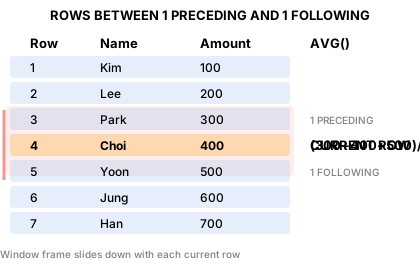
Window Frame Types
The ROWS BETWEEN clause specifies the range of the window. The computation result varies depending on the frame.
| Frame | Use Case | Example |
|---|---|---|
ROWS BETWEEN UNBOUNDED PRECEDING AND CURRENT ROW |
Running total (default) | Daily cumulative revenue |
ROWS BETWEEN 2 PRECEDING AND CURRENT ROW |
Moving average | 3-month moving average |
ROWS BETWEEN UNBOUNDED PRECEDING AND UNBOUNDED FOLLOWING |
Entire partition | Required for LAST_VALUE |
Already familiar?
If you are comfortable with window functions (ROW_NUMBER, RANK, LAG, SUM OVER), skip ahead to Lesson 19: CTE.
ROW_NUMBER, RANK, DENSE_RANK
Ranking functions assign a rank to each row within a partition.
| Function | Tie Handling | Rank Gaps |
|---|---|---|
ROW_NUMBER() |
Assigns arbitrary rank | — |
RANK() |
Same rank for ties | Yes (1,1,3) |
DENSE_RANK() |
Same rank for ties | No (1,1,2) |
-- Rank products by price within each category
SELECT
    cat.name            AS category,
    p.name              AS product_name,
    p.price,
    RANK() OVER (
        PARTITION BY p.category_id
        ORDER BY p.price DESC
    ) AS price_rank
FROM products AS p
INNER JOIN categories AS cat ON p.category_id = cat.id
WHERE p.is_active = 1
ORDER BY cat.name, price_rank
LIMIT 12;
Result (example):
| category | product_name | price | price_rank |
|---|---|---|---|
| 2-in-1 | Lenovo ThinkPad X1 2in1 Silver | 1866100.0 | 1 |
| 2-in-1 | Lenovo IdeaPad Flex 5 White | 1524800.0 | 2 |
| 2-in-1 | HP Pavilion x360 14 Black | 1479700.0 | 3 |
| 2-in-1 | Samsung Galaxy Book4 360 Black | 1388600.0 | 4 |
| 2-in-1 | Samsung Galaxy Book4 360 Black | 1267000.0 | 5 |
| 2-in-1 | HP Envy x360 15 Silver | 1214600.0 | 6 |
| 2-in-1 | Samsung Galaxy Book5 360 Black | 1179900.0 | 7 |
| AMD | AMD Ryzen 9 9900X | 591800.0 | 1 |
| ... | ... | ... | ... |
Top-N per Group
Wrapping a ranked query in a CTE or subquery lets you extract the top N items per partition.
-- Top 3 products per category by sales volume (units sold)
WITH ranked_sales AS (
    SELECT
        cat.name                        AS category,
        p.name                          AS product_name,
        SUM(oi.quantity)                AS units_sold,
        RANK() OVER (
            PARTITION BY p.category_id
            ORDER BY SUM(oi.quantity) DESC
        ) AS sales_rank
    FROM order_items AS oi
    INNER JOIN products   AS p   ON oi.product_id = p.id
    INNER JOIN categories AS cat ON p.category_id = cat.id
    INNER JOIN orders     AS o   ON oi.order_id   = o.id
    WHERE o.status IN ('delivered', 'confirmed')
    GROUP BY p.category_id, p.id, p.name, cat.name
)
SELECT category, product_name, units_sold, sales_rank
FROM ranked_sales
WHERE sales_rank <= 3
ORDER BY category, sales_rank;
SUM OVER — Running Totals
SUM() OVER (ORDER BY ...) computes a running total.
-- Monthly cumulative revenue for 2024
SELECT
    SUBSTR(ordered_at, 1, 7) AS year_month,
    SUM(total_amount)        AS monthly_revenue,
    SUM(SUM(total_amount)) OVER (
        ORDER BY SUBSTR(ordered_at, 1, 7)
    ) AS cumulative_revenue
FROM orders
WHERE ordered_at LIKE '2024%'
  AND status NOT IN ('cancelled', 'returned')
GROUP BY SUBSTR(ordered_at, 1, 7)
ORDER BY year_month;
Result (example):
| year_month | monthly_revenue | cumulative_revenue |
|---|---|---|
| 2024-01 | 298764720.0 | 298764720.0 |
| 2024-02 | 413105149.0 | 711869869.0 |
| 2024-03 | 527614956.0 | 1239484825.0 |
| 2024-04 | 463645381.0 | 1703130206.0 |
| 2024-05 | 444935778.0 | 2148065984.0 |
| 2024-06 | 373863202.0 | 2521929186.0 |
| 2024-07 | 360080397.0 | 2882009583.0 |
| 2024-08 | 407562440.0 | 3289572023.0 |
| ... | ... | ... |
LAG and LEAD — Referencing Adjacent Rows
LAG(col, n) references n rows before, and LEAD(col, n) references n rows after. You can also specify a default value when the referenced row does not exist.
-- Month-over-month revenue growth rate (MoM) for 2024
SELECT
    year_month,
    monthly_revenue,
    LAG(monthly_revenue) OVER (ORDER BY year_month) AS prev_month_revenue,
    ROUND(
        100.0 * (monthly_revenue - LAG(monthly_revenue) OVER (ORDER BY year_month))
              / LAG(monthly_revenue) OVER (ORDER BY year_month),
        1
    ) AS mom_growth_pct
FROM (
    SELECT
        SUBSTR(ordered_at, 1, 7) AS year_month,
        SUM(total_amount)        AS monthly_revenue
    FROM orders
    WHERE ordered_at LIKE '2024%'
      AND status NOT IN ('cancelled', 'returned')
    GROUP BY SUBSTR(ordered_at, 1, 7)
) AS monthly
ORDER BY year_month;
Result (example):
| year_month | monthly_revenue | prev_month_revenue | mom_growth_pct |
|---|---|---|---|
| 2024-01 | 298764720.0 | (NULL) | (NULL) |
| 2024-02 | 413105149.0 | 298764720.0 | 38.3 |
| 2024-03 | 527614956.0 | 413105149.0 | 27.7 |
| 2024-04 | 463645381.0 | 527614956.0 | -12.1 |
| 2024-05 | 444935778.0 | 463645381.0 | -4.0 |
| 2024-06 | 373863202.0 | 444935778.0 | -16.0 |
| 2024-07 | 360080397.0 | 373863202.0 | -3.7 |
| 2024-08 | 407562440.0 | 360080397.0 | 13.2 |
| ... | ... | ... | ... |
Using PARTITION BY with LEAD
-- VIP customers: order list with days until next order
SELECT
    c.name          AS customer_name,
    o.order_number,
    o.ordered_at,
    LEAD(o.ordered_at) OVER (
        PARTITION BY o.customer_id
        ORDER BY o.ordered_at
    ) AS next_order_date,
    ROUND(
        julianday(
            LEAD(o.ordered_at) OVER (PARTITION BY o.customer_id ORDER BY o.ordered_at)
        ) - julianday(o.ordered_at),
        0
    ) AS days_to_next_order
FROM orders AS o
INNER JOIN customers AS c ON o.customer_id = c.id
WHERE c.grade = 'VIP'
ORDER BY c.name, o.ordered_at
LIMIT 10;
-- VIP customers: order list with days until next order
SELECT
    c.name          AS customer_name,
    o.order_number,
    o.ordered_at,
    LEAD(o.ordered_at) OVER (
        PARTITION BY o.customer_id
        ORDER BY o.ordered_at
    ) AS next_order_date,
    DATEDIFF(
        LEAD(o.ordered_at) OVER (PARTITION BY o.customer_id ORDER BY o.ordered_at),
        o.ordered_at
    ) AS days_to_next_order
FROM orders AS o
INNER JOIN customers AS c ON o.customer_id = c.id
WHERE c.grade = 'VIP'
ORDER BY c.name, o.ordered_at
LIMIT 10;
-- VIP customers: order list with days until next order
SELECT
    c.name          AS customer_name,
    o.order_number,
    o.ordered_at,
    LEAD(o.ordered_at) OVER (
        PARTITION BY o.customer_id
        ORDER BY o.ordered_at
    ) AS next_order_date,
    LEAD(o.ordered_at) OVER (PARTITION BY o.customer_id ORDER BY o.ordered_at)::date
        - o.ordered_at::date
        AS days_to_next_order
FROM orders AS o
INNER JOIN customers AS c ON o.customer_id = c.id
WHERE c.grade = 'VIP'
ORDER BY c.name, o.ordered_at
LIMIT 10;
Additional Window Function Applications
Point Balance Verification (SUM OVER)
Verify whether balance_after in point_transactions is correct using SUM() OVER().
SELECT
    id,
    customer_id,
    type,
    reason,
    amount,
    balance_after,
    SUM(amount) OVER (
        PARTITION BY customer_id
        ORDER BY created_at, id
    ) AS calculated_balance,
    balance_after - SUM(amount) OVER (
        PARTITION BY customer_id
        ORDER BY created_at, id
    ) AS difference
FROM point_transactions
WHERE customer_id = 42
ORDER BY created_at, id;
Grade Change Tracking (LAG)
Track changes between previous and current grades in customer_grade_history.
SELECT
    customer_id,
    changed_at,
    old_grade,
    new_grade,
    reason,
    LAG(new_grade) OVER (
        PARTITION BY customer_id ORDER BY changed_at
    ) AS previous_record_grade,
    LEAD(changed_at) OVER (
        PARTITION BY customer_id ORDER BY changed_at
    ) AS next_change_date
FROM customer_grade_history
WHERE customer_id = 42
ORDER BY changed_at;
FIRST_VALUE and LAST_VALUE — First/Last Value in a Partition
FIRST_VALUE(col) retrieves the value from the first row of the window frame, and LAST_VALUE(col) retrieves the value from the last row.
| Function | Description |
|---|---|
FIRST_VALUE(col) OVER (PARTITION BY ... ORDER BY ...) |
First row value in the frame |
LAST_VALUE(col) OVER (... ROWS BETWEEN UNBOUNDED PRECEDING AND UNBOUNDED FOLLOWING) |
Last row value in the frame |
The LAST_VALUE Frame Trap
The default window frame is ROWS BETWEEN UNBOUNDED PRECEDING AND CURRENT ROW. With this default frame, LAST_VALUE always returns the value of the current row, so to get the actual last value of the partition, you must explicitly specify ROWS BETWEEN UNBOUNDED PRECEDING AND UNBOUNDED FOLLOWING.
-- Show the cheapest product (FIRST_VALUE) and
-- most expensive product (LAST_VALUE) per category
SELECT
    cat.name  AS category,
    p.name    AS product_name,
    p.price,
    FIRST_VALUE(p.name) OVER (
        PARTITION BY p.category_id
        ORDER BY p.price
    ) AS cheapest_product,
    LAST_VALUE(p.name) OVER (
        PARTITION BY p.category_id
        ORDER BY p.price
        ROWS BETWEEN UNBOUNDED PRECEDING AND UNBOUNDED FOLLOWING
    ) AS most_expensive_product
FROM products AS p
INNER JOIN categories AS cat ON p.category_id = cat.id
WHERE p.is_active = 1
ORDER BY cat.name, p.price
LIMIT 12;
FIRST_VALUE always returns the first row of the partition (the cheapest product) even with the default frame under ORDER BY p.price. In contrast, LAST_VALUE returns the value of the current row itself if ROWS BETWEEN UNBOUNDED PRECEDING AND UNBOUNDED FOLLOWING is not specified, so be careful.
Common real-world scenarios for window functions:
- Revenue ranking: Top-N by category/region (ROW_NUMBER, RANK)
- Trend analysis: Month-over-month growth, year-over-year comparison (LAG, LEAD)
- Cumulative metrics: Daily cumulative revenue, cumulative user count (SUM OVER)
- Segment analysis: Customer revenue quartiles, score percentiles (NTILE)
- Moving averages: 7-day/30-day moving averages for trend detection (ROWS BETWEEN)
Summary
| Function / Syntax | Use Case |
|---|---|
ROW_NUMBER() |
Unique sequence number within partition |
RANK() / DENSE_RANK() |
Ranking with ties (with/without gaps) |
SUM() OVER (ORDER BY ...) |
Running total |
LAG(col, n) / LEAD(col, n) |
Reference previous/next row |
NTILE(n) |
Divide into n equal groups |
FIRST_VALUE(col) |
First row value in frame |
LAST_VALUE(col) |
Last row value in frame (frame specification required) |
ROWS BETWEEN ... AND ... |
Window frame range specification |
Lesson Review Problems
These are simple problems to immediately test the concepts learned in this lesson. For comprehensive practice combining multiple concepts, see the Practice Problems section.
Practice Problems
Problem 1
Use DENSE_RANK() to rank all active products by price in descending order. Return product_name, price, overall_rank and show the top 10.
Answer
SELECT
    name    AS product_name,
    price,
    DENSE_RANK() OVER (ORDER BY price DESC) AS overall_rank
FROM products
WHERE is_active = 1
ORDER BY overall_rank
LIMIT 10;
**Result (example):**
| product_name | price | overall_rank |
|---|---|---|
| MacBook Air 15 M3 Silver | 5481100.0 | 1 |
| ASUS Dual RTX 5070 Ti [Special Limited Edition] Low-noise design, energy efficiency rated, eco-friendly packaging | 4496700.0 | 2 |
| Razer Blade 18 Black | 4353100.0 | 3 |
| Razer Blade 16 Silver | 3702900.0 | 4 |
| ASUS ROG Strix G16CH White | 3671500.0 | 5 |
| ASUS ROG Strix GT35 | 3296800.0 | 6 |
| Razer Blade 18 Black | 2987500.0 | 7 |
| ASUS Dual RTX 4060 Ti Black | 2674800.0 | 8 |
| ... | ... | ... |
Problem 2
Calculate the cumulative total of new customer signups by year (cumulative customer count from shop opening to each year). Return year, new_signups, cumulative_customers.
Answer
SELECT
    year,
    new_signups,
    SUM(new_signups) OVER (ORDER BY year) AS cumulative_customers
FROM (
    SELECT
        SUBSTR(created_at, 1, 4) AS year,
        COUNT(*)                 AS new_signups
    FROM customers
    GROUP BY SUBSTR(created_at, 1, 4)
) AS yearly
ORDER BY year;
**Result (example):**
| year | new_signups | cumulative_customers |
|---|---|---|
| 2016 | 100 | 100 |
| 2017 | 180 | 280 |
| 2018 | 300 | 580 |
| 2019 | 450 | 1030 |
| 2020 | 700 | 1730 |
| 2021 | 800 | 2530 |
| 2022 | 650 | 3180 |
| 2023 | 600 | 3780 |
| ... | ... | ... |
Problem 3
For each month in 2023 and 2024, calculate the year-over-year (YoY) revenue growth rate. Use LAG(revenue, 12) to compare with the same month last year. Return year_month, revenue, same_month_last_year, yoy_growth_pct.
Answer
SELECT
    year_month,
    revenue,
    LAG(revenue, 12) OVER (ORDER BY year_month) AS same_month_last_year,
    ROUND(
        100.0 * (revenue - LAG(revenue, 12) OVER (ORDER BY year_month))
              / LAG(revenue, 12) OVER (ORDER BY year_month),
        1
    ) AS yoy_growth_pct
FROM (
    SELECT
        SUBSTR(ordered_at, 1, 7) AS year_month,
        SUM(total_amount)        AS revenue
    FROM orders
    WHERE status NOT IN ('cancelled', 'returned')
      AND ordered_at BETWEEN '2022-01-01' AND '2024-12-31 23:59:59'
    GROUP BY SUBSTR(ordered_at, 1, 7)
) AS monthly
WHERE year_month >= '2023-01'
ORDER BY year_month;
**Result (example):**
| year_month | revenue | same_month_last_year | yoy_growth_pct |
|---|---|---|---|
| 2023-01 | 274226287.0 | (NULL) | (NULL) |
| 2023-02 | 333966148.0 | (NULL) | (NULL) |
| 2023-03 | 491087654.0 | (NULL) | (NULL) |
| 2023-04 | 403110649.0 | (NULL) | (NULL) |
| 2023-05 | 361101076.0 | (NULL) | (NULL) |
| 2023-06 | 288736533.0 | (NULL) | (NULL) |
| 2023-07 | 319249348.0 | (NULL) | (NULL) |
| 2023-08 | 366518636.0 | (NULL) | (NULL) |
| ... | ... | ... | ... |
Problem 4
Use ROW_NUMBER() to number each customer's orders and extract only the first order. Return customer_id, name, order_number, ordered_at, total_amount.
Answer
SELECT
    customer_id,
    name,
    order_number,
    ordered_at,
    total_amount
FROM (
    SELECT
        c.id        AS customer_id,
        c.name,
        o.order_number,
        o.ordered_at,
        o.total_amount,
        ROW_NUMBER() OVER (
            PARTITION BY o.customer_id
            ORDER BY o.ordered_at
        ) AS rn
    FROM orders AS o
    INNER JOIN customers AS c ON o.customer_id = c.id
    WHERE o.status NOT IN ('cancelled', 'returned')
) AS numbered
WHERE rn = 1
ORDER BY ordered_at
LIMIT 15;
**Result (example):**
| customer_id | name | order_number | ordered_at | total_amount |
|---|---|---|---|---|
| 90 | Joseph Sellers | ORD-20160109-00012 | 2016-01-09 10:20:06 | 211800.0 |
| 98 | Gabriel Walters | ORD-20160107-00010 | 2016-01-10 12:08:34 | 537800.0 |
| 85 | Ashley Hogan | ORD-20160112-00016 | 2016-01-15 17:24:53 | 704800.0 |
| 15 | Lydia Lawrence | ORD-20160111-00015 | 2016-01-16 08:39:08 | 211800.0 |
| 72 | Michael Hutchinson | ORD-20160117-00023 | 2016-01-17 16:32:31 | 167000.0 |
| 18 | Sara Williams | ORD-20160103-00004 | 2016-01-18 01:56:50 | 167000.0 |
| 30 | Austin Hunt | ORD-20160123-00029 | 2016-01-31 18:55:50 | 378369.0 |
| 3 | Adam Moore | ORD-20160208-00047 | 2016-02-11 20:59:38 | 390000.0 |
| ... | ... | ... | ... | ... |
Problem 5
Use RANK() and DENSE_RANK() together to rank product prices within each category. Return category_name, product_name, price, rank, dense_rank and show the top 15. You can observe the difference between the two ranking functions in the results.
Answer
SELECT
    cat.name AS category_name,
    p.name   AS product_name,
    p.price,
    RANK()       OVER (PARTITION BY p.category_id ORDER BY p.price DESC) AS rank,
    DENSE_RANK() OVER (PARTITION BY p.category_id ORDER BY p.price DESC) AS dense_rank
FROM products AS p
INNER JOIN categories AS cat ON p.category_id = cat.id
WHERE p.is_active = 1
ORDER BY cat.name, rank
LIMIT 15;
**Result (example):**
| category_name | product_name | price | rank | dense_rank |
|---|---|---|---|---|
| 2-in-1 | Lenovo ThinkPad X1 2in1 Silver | 1866100.0 | 1 | 1 |
| 2-in-1 | Lenovo IdeaPad Flex 5 White | 1524800.0 | 2 | 2 |
| 2-in-1 | HP Pavilion x360 14 Black | 1479700.0 | 3 | 3 |
| 2-in-1 | Samsung Galaxy Book4 360 Black | 1388600.0 | 4 | 4 |
| 2-in-1 | Samsung Galaxy Book4 360 Black | 1267000.0 | 5 | 5 |
| 2-in-1 | HP Envy x360 15 Silver | 1214600.0 | 6 | 6 |
| 2-in-1 | Samsung Galaxy Book5 360 Black | 1179900.0 | 7 | 7 |
| AMD | AMD Ryzen 9 9900X | 591800.0 | 1 | 1 |
| ... | ... | ... | ... | ... |
Problem 6
Calculate the 3-month moving average of monthly revenue for 2024. Use the ROWS BETWEEN 2 PRECEDING AND CURRENT ROW frame. Return year_month, monthly_revenue, moving_avg_3m.
Answer
SELECT
    year_month,
    monthly_revenue,
    ROUND(
        AVG(monthly_revenue) OVER (
            ORDER BY year_month
            ROWS BETWEEN 2 PRECEDING AND CURRENT ROW
        ), 2
    ) AS moving_avg_3m
FROM (
    SELECT
        SUBSTR(ordered_at, 1, 7) AS year_month,
        SUM(total_amount)        AS monthly_revenue
    FROM orders
    WHERE ordered_at LIKE '2024%'
      AND status NOT IN ('cancelled', 'returned')
    GROUP BY SUBSTR(ordered_at, 1, 7)
) AS monthly
ORDER BY year_month;
**Result (example):**
| year_month | monthly_revenue | moving_avg_3m |
|---|---|---|
| 2024-01 | 298764720.0 | 298764720.0 |
| 2024-02 | 413105149.0 | 355934934.5 |
| 2024-03 | 527614956.0 | 413161608.33 |
| 2024-04 | 463645381.0 | 468121828.67 |
| 2024-05 | 444935778.0 | 478732038.33 |
| 2024-06 | 373863202.0 | 427481453.67 |
| 2024-07 | 360080397.0 | 392959792.33 |
| 2024-08 | 407562440.0 | 380502013.0 |
| ... | ... | ... |
Problem 7
Use NTILE(4) to divide customers into 4 quartiles based on total purchase amount. Return name, grade, total_spent, quartile, sorted by quartile and total_spent descending. Show the top 20.
Answer
SELECT
    name,
    grade,
    total_spent,
    quartile
FROM (
    SELECT
        c.name,
        c.grade,
        SUM(o.total_amount) AS total_spent,
        NTILE(4) OVER (ORDER BY SUM(o.total_amount) DESC) AS quartile
    FROM customers AS c
    INNER JOIN orders AS o ON c.id = o.customer_id
    WHERE o.status NOT IN ('cancelled', 'returned')
    GROUP BY c.id, c.name, c.grade
) AS ranked
ORDER BY quartile, total_spent DESC
LIMIT 20;
**Result (example):**
| name | grade | total_spent | quartile |
|---|---|---|---|
| Allen Snyder | VIP | 407119725.0 | 1 |
| Jason Rivera | VIP | 375955231.0 | 1 |
| Ronald Arellano | VIP | 255055649.0 | 1 |
| Brenda Garcia | VIP | 253180338.0 | 1 |
| Courtney Huff | VIP | 248498783.0 | 1 |
| Gabriel Walters | VIP | 239477591.0 | 1 |
| James Banks | VIP | 237513053.0 | 1 |
| David York | GOLD | 207834908.0 | 1 |
| ... | ... | ... | ... |
Problem 8
Calculate cumulative units sold for each product by order date. Return product_name, ordered_at, quantity, cumulative_qty. Query for a specific product (id = 1).
Answer
SELECT
    p.name       AS product_name,
    o.ordered_at,
    oi.quantity,
    SUM(oi.quantity) OVER (
        ORDER BY o.ordered_at, o.id
        ROWS BETWEEN UNBOUNDED PRECEDING AND CURRENT ROW
    ) AS cumulative_qty
FROM order_items AS oi
INNER JOIN orders   AS o ON oi.order_id   = o.id
INNER JOIN products AS p ON oi.product_id = p.id
WHERE oi.product_id = 1
  AND o.status NOT IN ('cancelled', 'returned')
ORDER BY o.ordered_at;
**Result (example):**
| product_name | ordered_at | quantity | cumulative_qty |
|---|---|---|---|
| Razer Blade 18 Black | 2016-11-13 20:04:12 | 1 | 1 |
| Razer Blade 18 Black | 2016-11-19 08:54:25 | 1 | 2 |
| Razer Blade 18 Black | 2016-12-01 11:39:37 | 1 | 3 |
| Razer Blade 18 Black | 2017-01-16 13:21:17 | 1 | 4 |
| Razer Blade 18 Black | 2017-01-25 17:37:37 | 1 | 5 |
| Razer Blade 18 Black | 2017-01-30 14:18:22 | 1 | 6 |
| Razer Blade 18 Black | 2017-03-05 13:05:56 | 1 | 7 |
| Razer Blade 18 Black | 2017-03-20 17:34:00 | 1 | 8 |
| ... | ... | ... | ... |
Problem 9
Show the running headcount by department (by hire date order) along with the department total. Return department, name, role, hired_at, running_headcount, dept_total_headcount. Use COUNT(*) OVER for running_headcount and COUNT(*) OVER (PARTITION BY department) for dept_total_headcount.
Answer
SELECT
    department,
    name,
    role,
    hired_at,
    COUNT(*) OVER (
        PARTITION BY department
        ORDER BY hired_at
        ROWS BETWEEN UNBOUNDED PRECEDING AND CURRENT ROW
    ) AS running_headcount,
    COUNT(*) OVER (
        PARTITION BY department
    ) AS dept_total_headcount
FROM staff
WHERE is_active = 1
ORDER BY department, hired_at;
**Result (example):**
| department | name | role | hired_at | running_headcount | dept_total_headcount |
|---|---|---|---|---|---|
| Management | Michael Thomas | admin | 2016-05-23 | 1 | 3 |
| Management | Michael Mcguire | admin | 2017-08-20 | 2 | 3 |
| Management | Jonathan Smith | admin | 2022-10-12 | 3 | 3 |
| Marketing | Nicole Hamilton | manager | 2024-08-05 | 1 | 1 |
| Sales | Jaime Phelps | manager | 2022-03-02 | 1 | 1 |
| ... | ... | ... | ... | ... | ... |
Problem 10
Calculate the interval (in days) between each customer's orders and find the average order interval per customer. Use LAG to reference the previous order date. Return customer_id, name, order_count, avg_days_between_orders.
Answer
SELECT
    customer_id,
    name,
    order_count,
    ROUND(AVG(days_gap), 1) AS avg_days_between_orders
FROM (
    SELECT
        c.id   AS customer_id,
        c.name,
        COUNT(*) OVER (PARTITION BY o.customer_id) AS order_count,
        ROUND(
            julianday(o.ordered_at)
            - julianday(LAG(o.ordered_at) OVER (
                  PARTITION BY o.customer_id ORDER BY o.ordered_at
              )),
            0
        ) AS days_gap
    FROM orders AS o
    INNER JOIN customers AS c ON o.customer_id = c.id
    WHERE o.status NOT IN ('cancelled', 'returned')
) AS gaps
WHERE days_gap IS NOT NULL
GROUP BY customer_id, name, order_count
HAVING order_count >= 5
ORDER BY avg_days_between_orders
LIMIT 15;
Result (example):
| customer_id | name | order_count | avg_days_between_orders |
|---|---|---|---|
| 97 | Jason Rivera | 346 | 10.0 |
| 226 | Allen Snyder | 307 | 10.6 |
| 549 | Ronald Arellano | 220 | 12.0 |
| 4840 | Jennifer Bradshaw | 7 | 12.0 |
| 356 | Courtney Huff | 226 | 12.2 |
| 98 | Gabriel Walters | 283 | 12.8 |
| 162 | Brenda Garcia | 249 | 13.0 |
| 1323 | Austin Townsend | 164 | 13.2 |
| ... | ... | ... | ... |
=== "MySQL"
    ```sql
    SELECT
        customer_id,
        name,
        order_count,
        ROUND(AVG(days_gap), 1) AS avg_days_between_orders
    FROM (
        SELECT
            c.id   AS customer_id,
            c.name,
            COUNT(*) OVER (PARTITION BY o.customer_id) AS order_count,
            DATEDIFF(
                o.ordered_at,
                LAG(o.ordered_at) OVER (
                    PARTITION BY o.customer_id ORDER BY o.ordered_at
                )
            ) AS days_gap
        FROM orders AS o
        INNER JOIN customers AS c ON o.customer_id = c.id
        WHERE o.status NOT IN ('cancelled', 'returned')
    ) AS gaps
    WHERE days_gap IS NOT NULL
    GROUP BY customer_id, name, order_count
    HAVING order_count >= 5
    ORDER BY avg_days_between_orders
    LIMIT 15;
    ```

=== "PostgreSQL"
    ```sql
    SELECT
        customer_id,
        name,
        order_count,
        ROUND(AVG(days_gap), 1) AS avg_days_between_orders
    FROM (
        SELECT
            c.id   AS customer_id,
            c.name,
            COUNT(*) OVER (PARTITION BY o.customer_id) AS order_count,
            o.ordered_at::date
                - (LAG(o.ordered_at) OVER (
                       PARTITION BY o.customer_id ORDER BY o.ordered_at
                   ))::date
                AS days_gap
        FROM orders AS o
        INNER JOIN customers AS c ON o.customer_id = c.id
        WHERE o.status NOT IN ('cancelled', 'returned')
    ) AS gaps
    WHERE days_gap IS NOT NULL
    GROUP BY customer_id, name, order_count
    HAVING order_count >= 5
    ORDER BY avg_days_between_orders
    LIMIT 15;
    ```
Problem 11
For each category, display each product's name, price, the cheapest product name in that category (cheapest_in_category), and the most expensive product name (priciest_in_category). Use FIRST_VALUE and LAST_VALUE, targeting active products only. Return category, product_name, price, cheapest_in_category, priciest_in_category and show the top 15.
Answer
SELECT
    cat.name  AS category,
    p.name    AS product_name,
    p.price,
    FIRST_VALUE(p.name) OVER (
        PARTITION BY p.category_id
        ORDER BY p.price
        ROWS BETWEEN UNBOUNDED PRECEDING AND UNBOUNDED FOLLOWING
    ) AS cheapest_in_category,
    LAST_VALUE(p.name) OVER (
        PARTITION BY p.category_id
        ORDER BY p.price
        ROWS BETWEEN UNBOUNDED PRECEDING AND UNBOUNDED FOLLOWING
    ) AS priciest_in_category
FROM products AS p
INNER JOIN categories AS cat ON p.category_id = cat.id
WHERE p.is_active = 1
ORDER BY cat.name, p.price
LIMIT 15;
**Result (example):**
| category | product_name | price | cheapest_in_category | priciest_in_category |
|---|---|---|---|---|
| 2-in-1 | Samsung Galaxy Book5 360 Black | 1179900.0 | Samsung Galaxy Book5 360 Black | Lenovo ThinkPad X1 2in1 Silver |
| 2-in-1 | HP Envy x360 15 Silver | 1214600.0 | Samsung Galaxy Book5 360 Black | Lenovo ThinkPad X1 2in1 Silver |
| 2-in-1 | Samsung Galaxy Book4 360 Black | 1267000.0 | Samsung Galaxy Book5 360 Black | Lenovo ThinkPad X1 2in1 Silver |
| 2-in-1 | Samsung Galaxy Book4 360 Black | 1388600.0 | Samsung Galaxy Book5 360 Black | Lenovo ThinkPad X1 2in1 Silver |
| 2-in-1 | HP Pavilion x360 14 Black | 1479700.0 | Samsung Galaxy Book5 360 Black | Lenovo ThinkPad X1 2in1 Silver |
| 2-in-1 | Lenovo IdeaPad Flex 5 White | 1524800.0 | Samsung Galaxy Book5 360 Black | Lenovo ThinkPad X1 2in1 Silver |
| 2-in-1 | Lenovo ThinkPad X1 2in1 Silver | 1866100.0 | Samsung Galaxy Book5 360 Black | Lenovo ThinkPad X1 2in1 Silver |
| AMD | AMD Ryzen 9 9900X | 335700.0 | AMD Ryzen 9 9900X | AMD Ryzen 9 9900X |
| ... | ... | ... | ... | ... |
Scoring Guide
| Score | Next Step |
|---|---|
| 10-11 | Move to Lesson 19: CTE |
| 8-9 | Review the explanations for incorrect answers, then proceed |
| Half or less | Re-read this lesson |
| 3 or fewer | Start again from Lesson 17: Transactions |
Problem Areas:
| Area | Problems |
|---|---|
| DENSE_RANK / RANK | 1, 5 |
| Running total (SUM OVER) | 2, 8 |
| YoY growth rate (LAG) | 3, 10 |
| ROW_NUMBER + PARTITION | 4 |
| Moving average (ROWS BETWEEN) | 6 |
| NTILE (quartile) | 7 |
| Cumulative aggregate + department | 9 |
| FIRST_VALUE / LAST_VALUE | 11 |